1.0 WHATSAPP DOMINANCE IN NIGERIA
For most Nigerians, the morning doesn’t start with an alarm. It starts with a notification bubble on a green icon. Before a Nigerian opens their eyes fully, their thumb is already moving, scrolling through a family group chat that never sleeps, a vendor who sent a price list at midnight, or someone who dropped a voice note they’re not ready to hear yet.
On average, Nigerian internet users spend over 6 hours daily on social media,1 and a good amount of that time is spent in the same green app, which, used by 95.3% of Nigerian internet users,2 boasts the highest penetration. In a population where data subscription is both expensive and unreliable, this makes all the difference as WhatsApp’s dominance is, in part, a function of how cheap it is to use, largely because staying connected on it can cost as little as ₦25 a day.345
The platform’s dominance, however, goes beyond affordability. Nigeria is a country of over 500 languages,6 uneven literacy levels, and a culture where many everyday transactions are driven by conversations—messages, calls, and voice notes—rather than formal processes or documentation. In this environment, WhatsApp fits seamlessly. Voice notes take the place of long typed messages, blurry price-list JPEGs stand in for websites, and group chats become shopfronts. Rather than asking Nigerians to adapt, the platform embeds itself, already fluent in how they communicate.
WhatsApp is the operating system of Nigerian commerce and community and it is the backbone of most meaningful ventures. It is the space where trust and value are negotiated in real time, principally because a WhatsApp notification carries an expectation of response, one shaped by a social contract where ignoring a message registers as a slight, unlike the easy silence of an email inbox. For the 40 million MSMEs driving the nation,7 it is the primary shopfront that is circumventing the digital desert where websites go unvisited and emails go unseen.
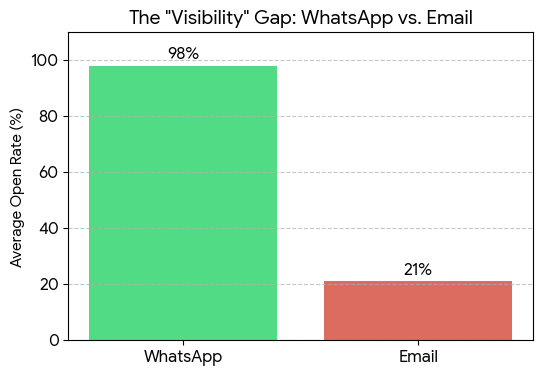
WhatsApp is also used as a high-fidelity research tool. In a landscape where traditional surveys fail, WhatsApp achieves a 62% response rate by meeting Nigerians in their natural conversational element, allowing for a level of data inclusivity that formal outreach cannot replicate.8
Beyond that, when young Nigerians took to the streets in October 2020 to demand an end to police brutality, it was WhatsApp groups,9 running quietly alongside twitter’s noise, that coordinated where to march, which routes were safe, and who had been arrested. Also, when health workers in Katsina needed to reach communities too far and too poor for clinic visits, it was a WhatsApp group that moved vaccination information faster than any government channel could.10
WhatsApp is where Nigeria’s $20 billion annual diaspora remittance flow11 begins, not in a bank, but in a chat window. When a family in Lagos negotiates how much their son in London should send home, that decision is finalized in a message long before it ever touches a fintech app. The barriers to digital reach in Nigeria are systemic, but WhatsApp has worked around every one of them. While the global internet is vast, the Nigerian experience is a localized funnel: to reach consumers, organize communities, or share information when it matters, you use one platform because the green app holds over 90% of the nation’s daily attention.
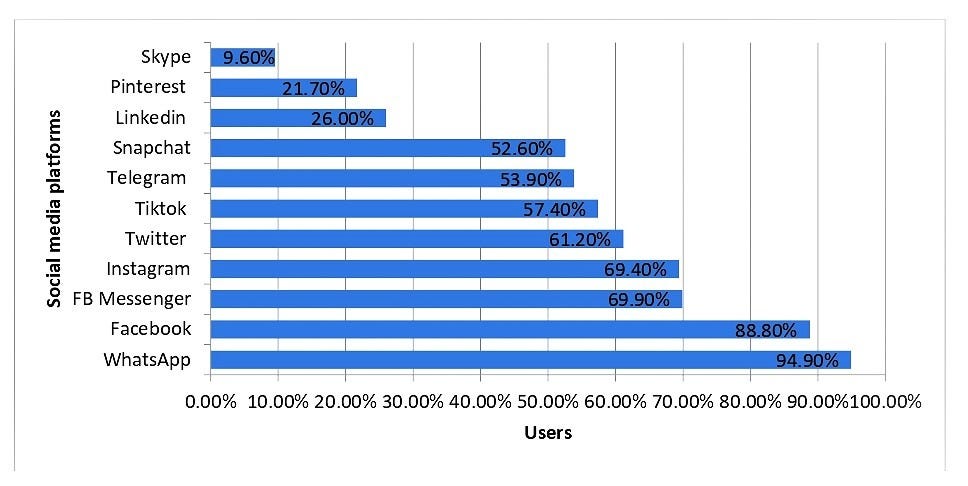
For some, WhatsApp is just an app. For others, it’s where everything happens. Friendships, business, conversations, life itself, condensed into a small green icon. Tucked away somewhere within the above statistic sits Lamja. This is his story, and in many ways, it is Nigeria’s.
2.0 MEET LAMJA
It wasn’t hard to explain why he spent so much time on WhatsApp. Everyone he knows was there.
From morning till night, the app never really slept. Class group chats, family updates, vendor broadcasts, late-night banter, basically everything passed through it. For most people, it was just one of the places where life happened. For him, it was almost the only place it did.
He wasn’t exactly antisocial. Just quiet and shy. He was the kind of person that preferred texting to calling. The kind of person who typed, erased, and retyped messages before sending them. The kind who noticed when replies took too long… and noticed even more when they never came at all.
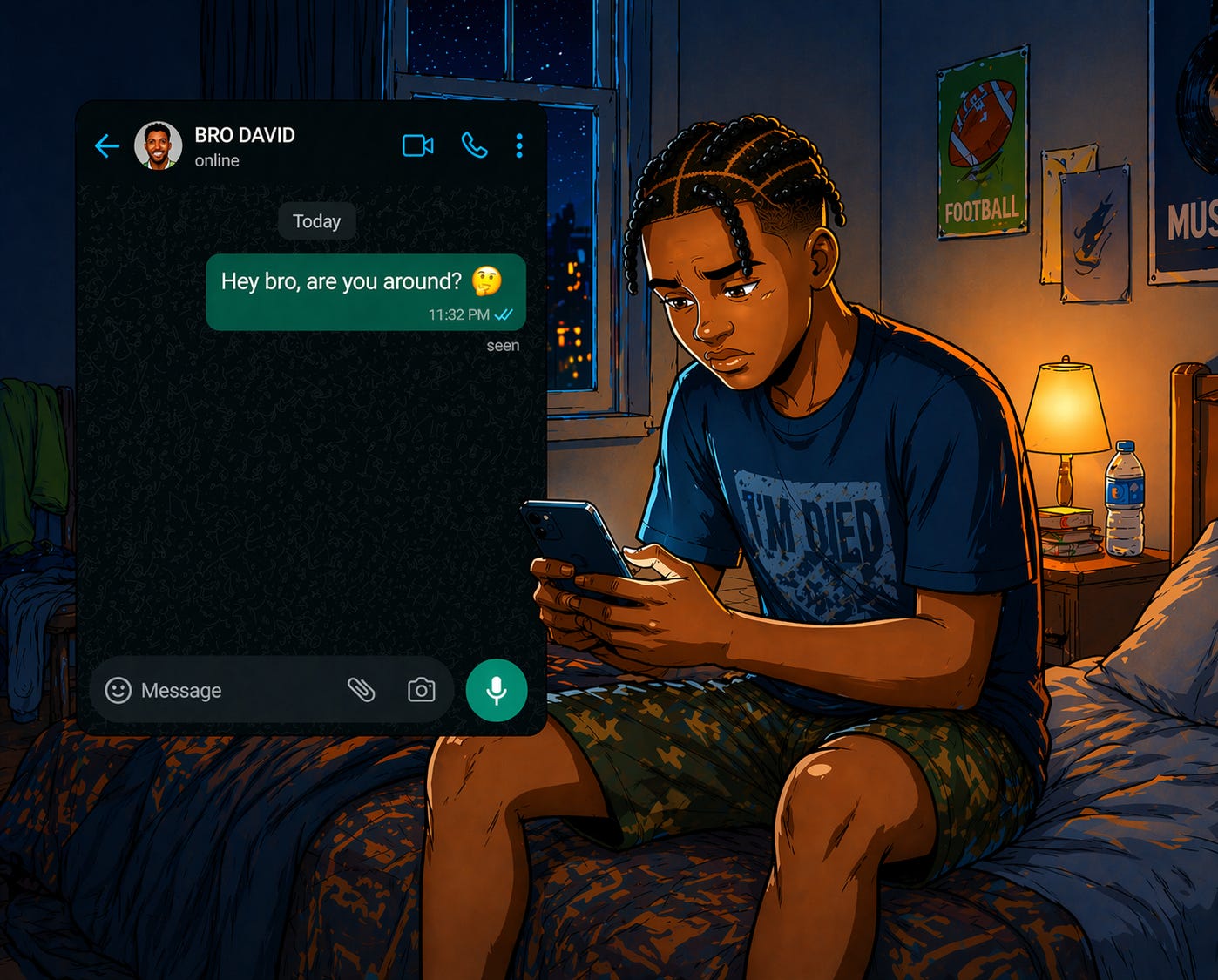
“Seen.”
That single word had become too familiar.
Friends would open his messages and forget to reply. Classmates would respond hours later with dry, one-word answers. Even when conversations started well, they rarely went anywhere.
The worst one was his crush.
He had finally worked up the courage to text her one evening, nothing serious, just something casual but hours passed, the message stayed there, read and untouched. He checked again before sleeping. Still nothing. By the next morning, he told himself it didn’t matter.

But who was he kidding? It did.
Later that week, he decided to restock his gym supplements. He had some USDC sitting idle and wanted to convert part of it to naira to make the purchase. And like everyone else, he turned to P2P.
He found a vendor, the rates he was given were decent, the instructions were clear and the order was initiated.
“Paid,” said the vendor.
Lamja, being a trusting person, released his USDC before confirming the credit alert and the order was marked as completed. Then he waited.
And waited.
No credit alert.
He went back to the order, frantically refreshed the chat and rechecked the transaction to confirm if everything had gone through on his end. But it wasn’t from his end.
So he sent a follow-up message, telling the vendor he was yet to receive his money.
But he got no response.
Minutes turned into an hour. The vendor was online… but silent.
“Seen.”
Again.
Except this time, he wasn’t feeling awkward. The feeling was panic. His hard-earned money was at risk.
He tried messaging again, didn’t get a reply back. He tried calling but silence answered the call. Eventually, it hit him.
He hadn’t just been ignored.
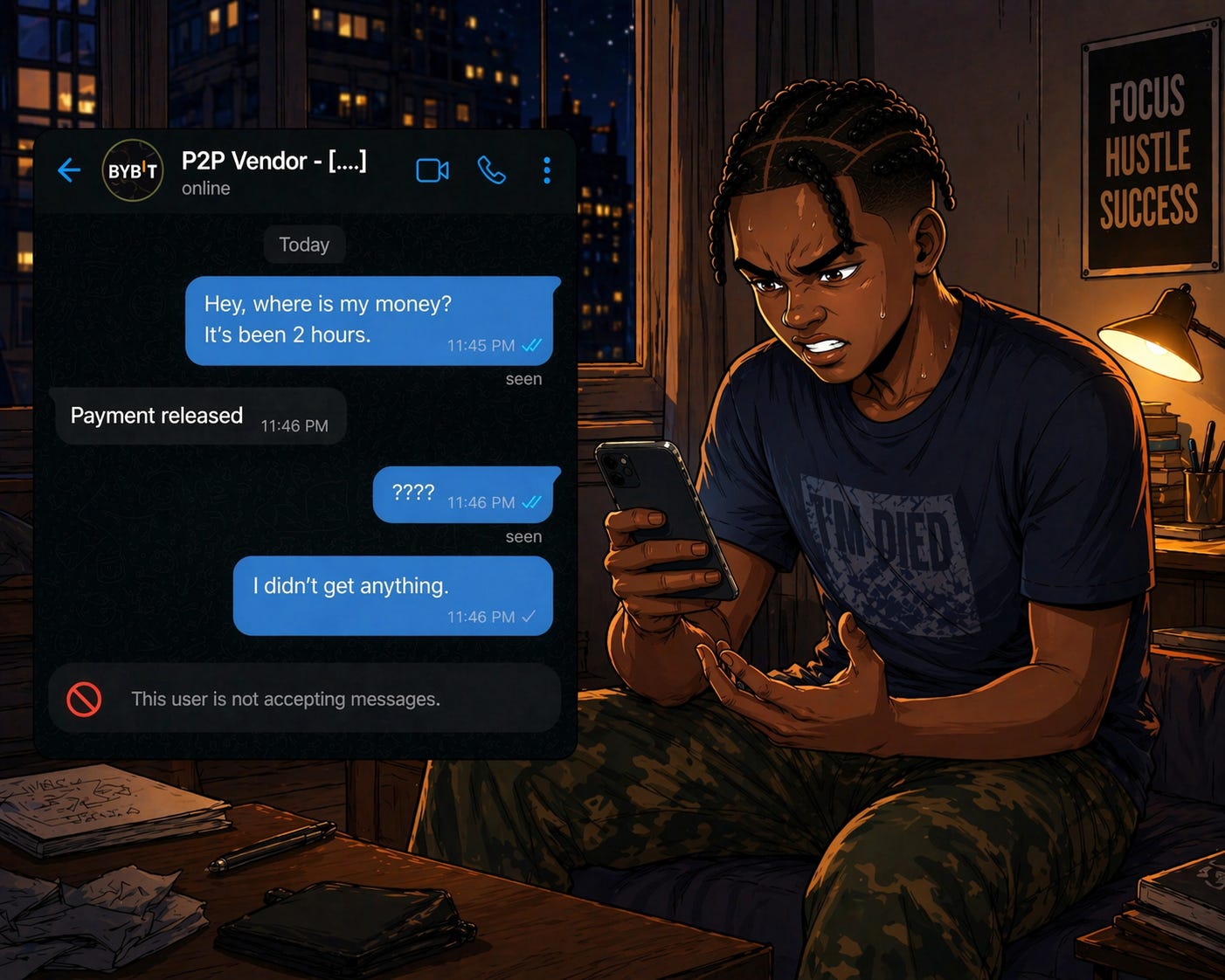
He had been scammed, and ghosted.
3.0 THE BROADER NIGERIAN P2P PAIN POINTS
Lamja’s situation wasn’t even a rare story. He later found out how common it was to experience P2P delays, scams, disputes and vendors disappearing mid-transaction. In a system where you had to trust a stranger on the other side of a chat, things went wrong more often than people admitted.
To understand why, you have to understand how Nigeria ended up here. The naira has lost more than 75% of its value since 2016.12 So Nigerians did what Nigerians do—they found a way. P2P crypto trading became an informal hedge. A way to hold value in USDT when the naira was bleeding.
It served to maintain financial stability in the face of a banking system that had consistently failed the common people. By 2024, Nigeria ranked second globally in crypto adoption, with P2P making up 68% of all crypto activity, more than double the global average.13 Then Binance collapsed the floor. In early 2024, Nigerian authorities blocked Binance’s P2P services entirely, alleging that over $26 billion had flowed through the platform in 2023 and that its marketplace was manipulating the naira exchange rate.14
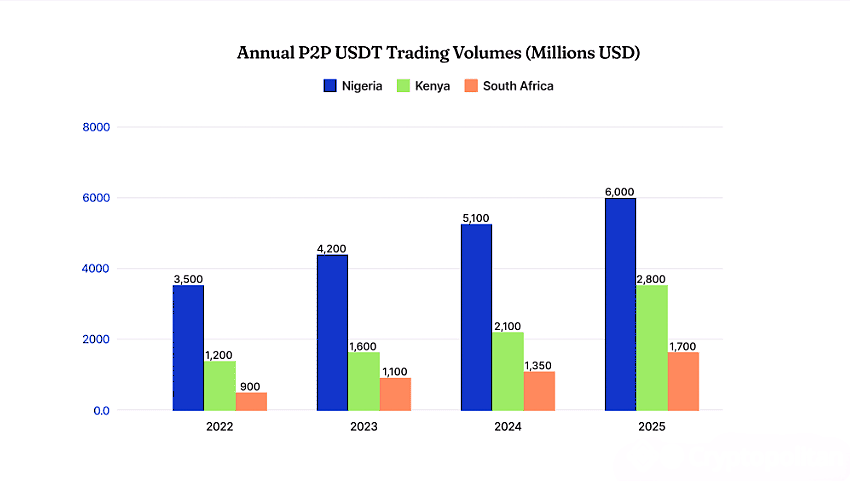
Two executives were detained. Naira trading was suspended. Overnight, millions of traders migrated to Bybit, KuCoin, and informal Telegram and WhatsApp groups, where there was no escrow, no dispute resolution, and no protection at all. Bybit had the features. It wasn’t banned. But it arrived in Nigeria’s market without being built for it, operating in a regulatory grey zone, accessible but unregulated. That gap between accessibility and accountability is exactly where fraudulent vendors learned to live
The scam Lamja fell for has a name: fake payment proof. The vendor marks the order paid, sends an edited screenshot, the crypto is released, and the naira never arrives. Chargeback fraud works differently, the vendor initiates a real transfer, waits for the crypto, then calls their bank to reverse the payment. The naira disappears, and the crypto is already gone. Then there is the most invisible danger of all. A buyer pays you naira from an account connected to fraud. The transaction looks clean; weeks later, the EFCC traces the fund flow and freezes every account that received money from that tainted source, including yours, even though you knew nothing and did nothing wrong.
A Breet P2P research report, conducted across 100+ live trades, found that payout times ranged from 3 minutes to 86 minutes, and 31% of transactions had discrepancies such as missing kobo, deductions, or reduced rates, while 17.5% of trades involved fraud or manipulation attempts like fake receipts, ghost payments, or pressure to release crypto before payment landed. The analysis of 20,000+ tweets reinforces the same pattern, revealing overwhelmingly negative sentiment and recurring complaints about fake alerts, missing funds, delayed payments, and poor support, which is often slow, inconsistent, or unhelpful.15
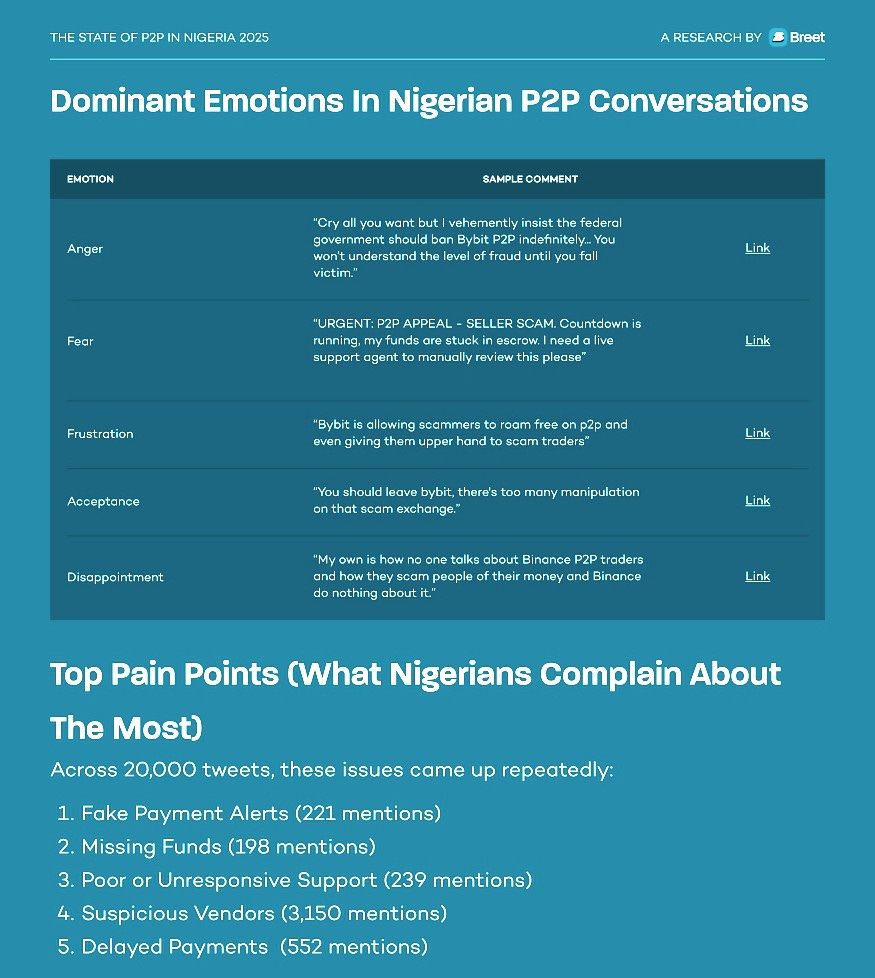
That is the architecture of the problem: beyond bad actors, it is also a system where trust metrics can be gamed, dispute resolution moves too slowly, and the most vulnerable users have the least leverage when things go wrong.
Aside from the security problems, there is also the learning curve nobody warns you about. P2P platforms were not designed with the average Nigerian user in mind. The interfaces are dense, the steps are rarely intuitive, and new users routinely release funds at the wrong stage or send their crypto assets to the wrong network. In a market where a single misstep means a lost transaction, complexity isn’t merely an inconvenience. It is a cost. And millions of people were still paying these costs—until Xpend decided they no longer had to.
4.0 INTRODUCING XPEND
Most solutions to Nigeria’s P2P problem have tried to fix the platform, improve KYC, speed up dispute resolution, or even implement stricter vendor verification. Xpend posed an entirely different question: what if you never required P2P at all?
Xpend is designed as a conversational AI layer for digital assets that lives wherever you are. Whether you’re using its dedicated interface or familiar apps like WhatsApp, you can spend stablecoins directly on real-world expenses through intuitive commands, bypassing the friction of local currency conversion.
Load stablecoins like USDT/USDC once and pay out in naira, generate invoices, settle bills, buy airtime, and send gifts—all from a single WhatsApp conversation. No new app to download or new wallet interface to interact with, just a conversation on the platform where you already live.
The friction Xpend removes is not incidental; it’s the main problem an entire industry faces. Traditional crypto spending requires several steps—converting assets, finding a vendor, initiating a P2P trade, and waiting for a credit alert that may never come—each of which is a moment where something can go wrong and often does. Xpend collapses that process into a message(s).
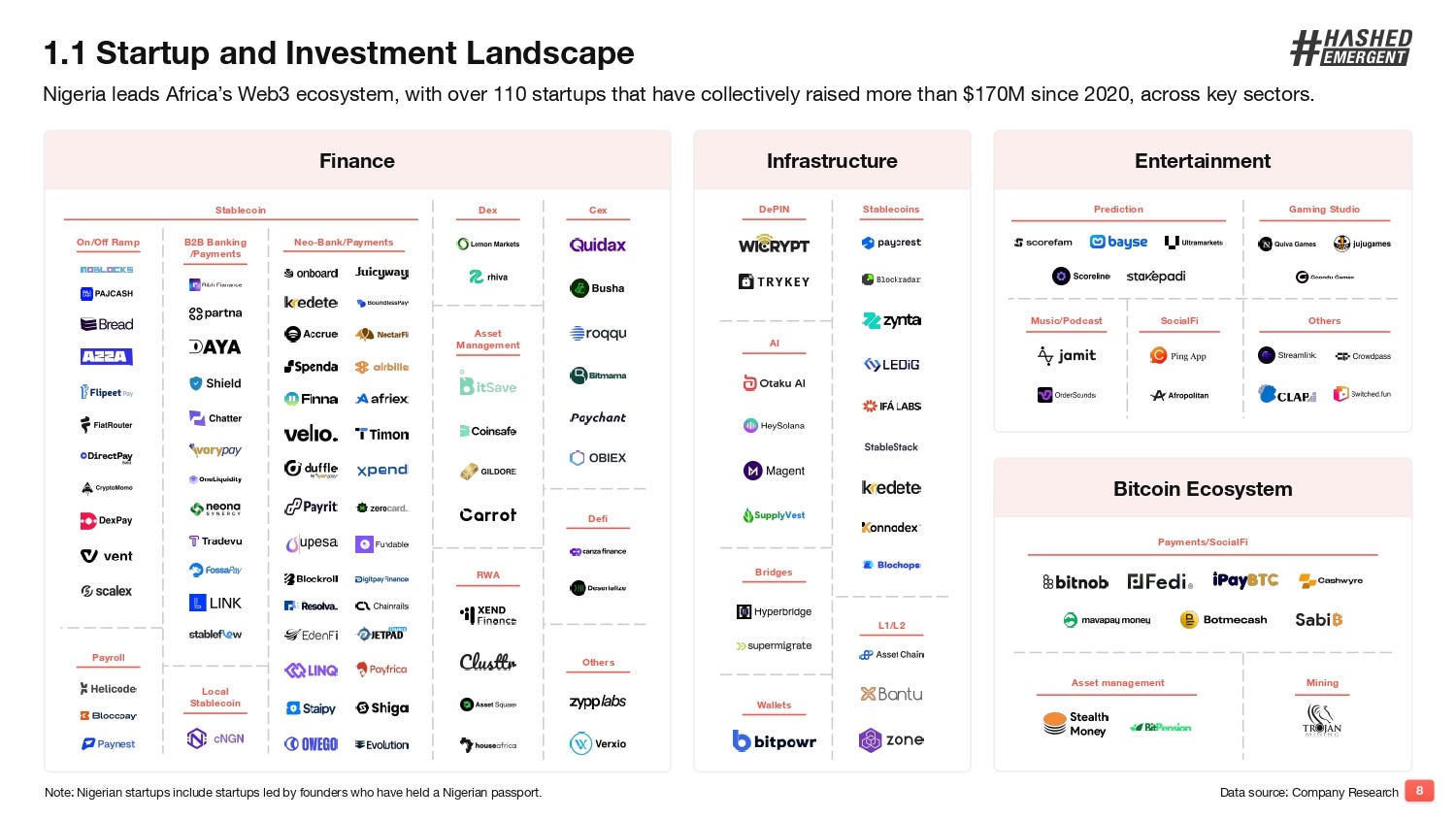
Xpend’s rapid traction validates its product-market fit, having processed $240,000 through 13,000 transactions for over 7,500 users16 within months of its August 2025 launch. Its industry standing is further cemented by a victory at the Startup World Cup Nigeria,17 backing from the Solana Foundation,18 and inclusion in the Hashed Emergent Nigeria Web3 Landscape Report 2025 (2nd edition).19 Currently, they are preparing for a rollout in Ghana and Kenya, scheduled for Q4 2026. Xpend is evolving from a local P2P fix into a pan-African payment powerhouse.
The platform now supports USDC and USDT deposits via Solana, meaning users can deposit stablecoins and spend them directly—paying bills, sending invoices, and receiving payments—without touching an off-ramp. USDC and USDT transactions on Xpend are completely free. There are no conversion fees, and users can earn cashback when they deposit USDT or USDC on the Solana network and spend over ₦5,000.20
For Lamja, a tool like this would have prevented everything. Beyond just the lost USDC, the hours of panic and the unanswered messages.
4.1 WHY SOLANA?
Every payment system is only as effective as the rails it runs on. Xpend chose Solana, and that choice is not cosmetic. It is the reason the experience feels the way it does. But Xpend is not alone in that choice. Visa, Stripe, PayPal, BlackRock, J.P. Morgan, and Western Union all chose Solana.2122 When a substantial number of the most powerful financial institutions and platforms in the world independently arrive at the same infrastructure decision, it stops being a bet and starts being a verdict. Solana is where the serious money is building—and Xpend is building there too.
The reason is simple: Solana processes transactions in under a second. For context, a bank transfer in Nigeria can take minutes, hours, or occasionally days. A Bitcoin transaction can take ten minutes or more.23 On Solana, by the time you’ve dropped an instruction in chat, the settlement is already happening.
Then there are the fees, or more accurately, the absence of them. Solana transactions cost a fraction of a naira regardless of the amount being moved. This matters enormously for the small, everyday transactions that define most Nigerian financial lives: buying airtime, settling a vendor invoice, and paying a bill.2425 Small transactions face stiff penalties on networks with high fees. On Solana, they cost almost nothing. This is exactly why Xpend’s USDC and USDT transactions on Solana come with minimal costs for users. The network makes it possible to absorb those costs without passing them on.
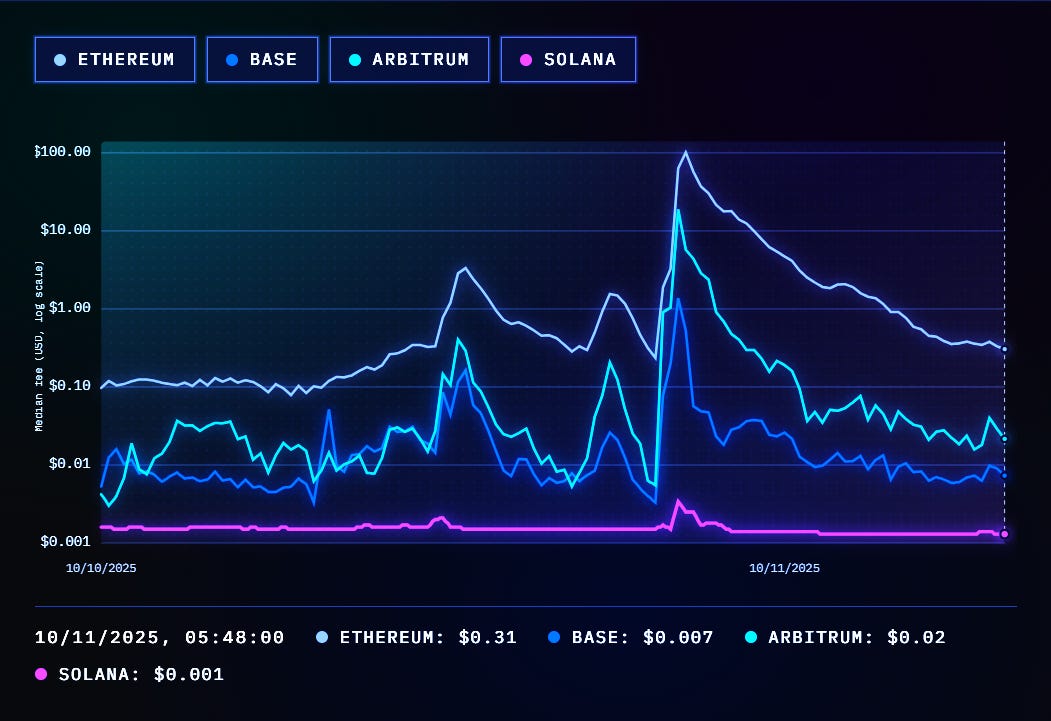
The broader momentum signals Solana’s growing dominance and further validates Xpend’s positioning. X recently launched Cashtags on Solana—letting users post and search stock tickers and crypto contract addresses without leaving the app.26 The first Y Combinator company to receive its funding entirely in stablecoins is building on Solana.27 The pattern is consistent: when builders want speed, low cost, and a network that can handle real-world scale, they choose Solana.
For a population already paying conversion fees, P2P spreads, and bank charges at every turn, minimal cost transactions on a network this fast aren’t a promotion. They are a fundamental redesign of what spending crypto in Nigeria should feel like: fast, little to no fees, and institutional-grade reliability. They are the reason Xpend can make a promise most crypto platforms in Nigeria have never kept: that spending your money will be instant, cheap, and will just work.
4.2 XPEND FEATURES: A SNAPSHOT
Every Xpend feature was born from a real-world challenge faced by Nigerians trying to navigate everyday transactions. Here is how they’ve transformed those hurdles into a seamless experience.
USDT/USDC to Naira Payouts: Load stablecoins once and send naira directly to any bank account or mobile wallet with a single message.
Invoicing and Payment Links: Generate invoices and shareable payment links directly from WhatsApp. For freelancers and small business owners, this feature replaces the awkward “send me the money” text or voice note with something clean, documented, and professional.
Airtime and Data Top-ups: Buy airtime or data for yourself, your staff, or your vendors without leaving the conversation or off-ramping your stablecoins first. In a country where running out of data mid-transaction is a real problem, this feature matters more than it sounds.
Utility Bill Payments: Pay electricity and other utility bills directly in the conversation. Get rid of the multiple step flows other apps clutter your day with.
Xpackets (Gifting): Send crypto gifts as shareable claim links inside WhatsApp. The recipient taps, claims, and spends the value on whatever they want — airtime, data, bills, or a moment of joy. It makes sending money feel more like a gesture than a transaction.
Wager: Stake crypto or naira on friendly bets between friends — who wins the match, whose business goal lands first, or any disagreement with a clear outcome. Private wagers stay inside your circle; public ones let anyone join. Whoever’s right claims the pot.
Cashback on Solana Deposits: By depositing USDT or USDC via the Solana network, you earn cashback on spends up to ₦5,000. It’s essentially a rebate on your everyday financial movement.
Live FX Naira Preview: Every transaction shows its exact naira value at the best available rate before you complete it.
Referral Commissions: Refer someone to Xpend, and when they transact, you instantly earn 200 NGN.
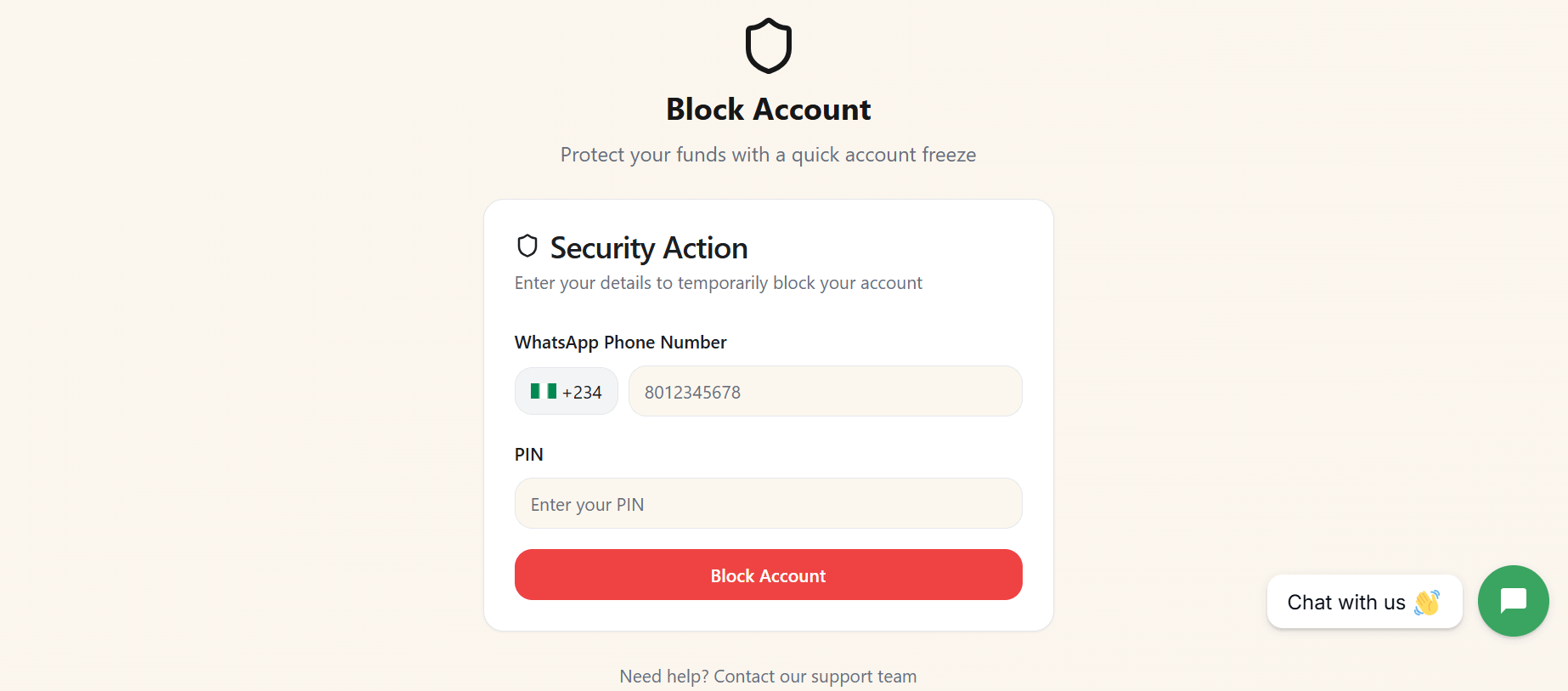
Security: Xpend combines multiple layers of protection, including payment passcodes, biometric login and private chat lock. If you lose your phone, your account remains accessible from any device, so your funds are never out of reach. If your device is compromised, you can quickly block your account from the Xpend website using your WhatsApp number and PIN, instantly freezing activity and protecting your funds until you regain access.
4.3 USING XPEND FEATURES: A VISUAL GUIDE
Xpend positions itself as a WhatsApp-native platform, but during my testing, its WhatsApp interface had been temporarily disabled by Meta. For a product built around conversational finance, that could have been a breaking point.
It wasn’t.
All tests in this section were conducted using Xpend’s web app. Interestingly, this did not significantly alter the experience, reinforcing Xpend’s underlying design principle: WhatsApp is only the interface, not the system itself.28
The same account, balances, and transaction flows remained fully accessible through the web app, with the conversational experience largely intact even outside WhatsApp. The WhatsApp interface is expected to be restored soon,29 and a subsequent release of the app on both the Play Store and the App Store is underway.
So with that being said, let’s set up your Xpend account.
Step 1: Setting Up Your Xpend Account
For iOS and Android, use this link: app.justxpend.ai
The signup process begins on a clean welcome screen with two clear options: Create account or Login to Xpend. If you are new to the platform, tap Create account to begin.
After selecting Create account, you are taken to the signup form. Here, you will be asked to enter your first name, last name, email address, and WhatsApp phone number. There is a note below the form encouraging you to use your active WhatsApp number so you can continue using Xpend inside WhatsApp too.
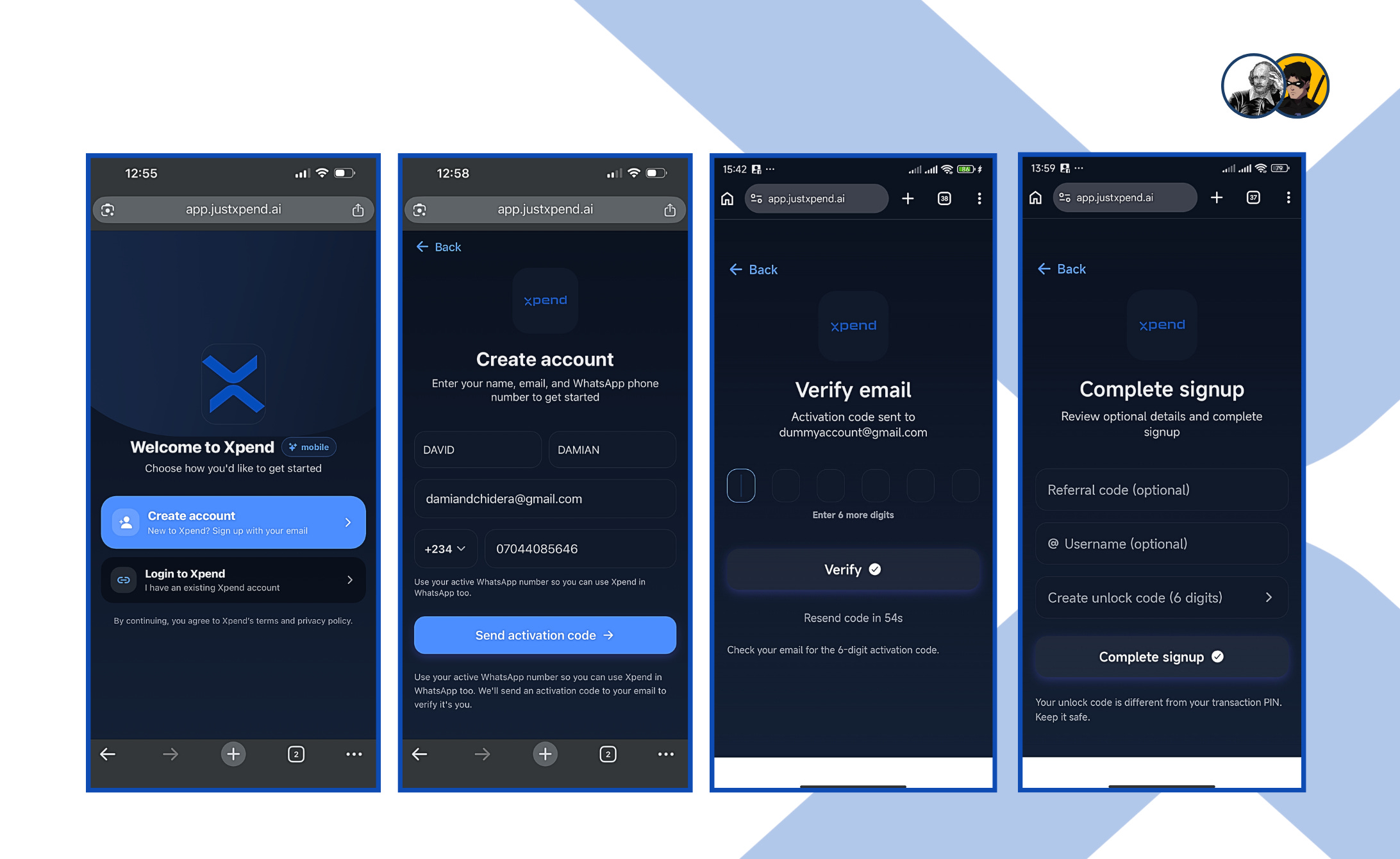
Once your details are submitted, Xpend sends an activation code to your email. You enter the code on the verification screen and tap verify to continue.
The final step is completing your signup. You can add a referral code or username if you want, then you are asked to create a six-digit unlock code.
There is a note clarifying that this is different from your transaction PIN, which helps avoid confusion later. Once you tap Complete signup, your account is fully set up and ready to use.
Step 2: Depositing Your Stablecoins
Once you're in the app, tap “Add money.” You'll see a deposit screen asking if you want to use naira or crypto. Don't worry about filling everything out—Xpend lets you leave some fields blank so you can finish up in the chat instead. Here, you select Crypto, enter the amount you want to deposit, and choose the network you want to use. In this test, the deposit route was set to Solana USDC, and the amount entered was 10 USDC. After that, you tap Get deposit details to continue.
Note: All transactions on Xpend are processed in USDT. If you send USDC, it’s automatically converted to USDT. This design choice is intentional. Rather than maintaining multiple token balances, Xpend standardizes all transactions in USDT to keep the experience simple and consistent.
From there, Xpend moves the process into the chat itself, where the platform responds with a deposit card showing the amount, the network, a QR code, and the wallet address you need to send to.
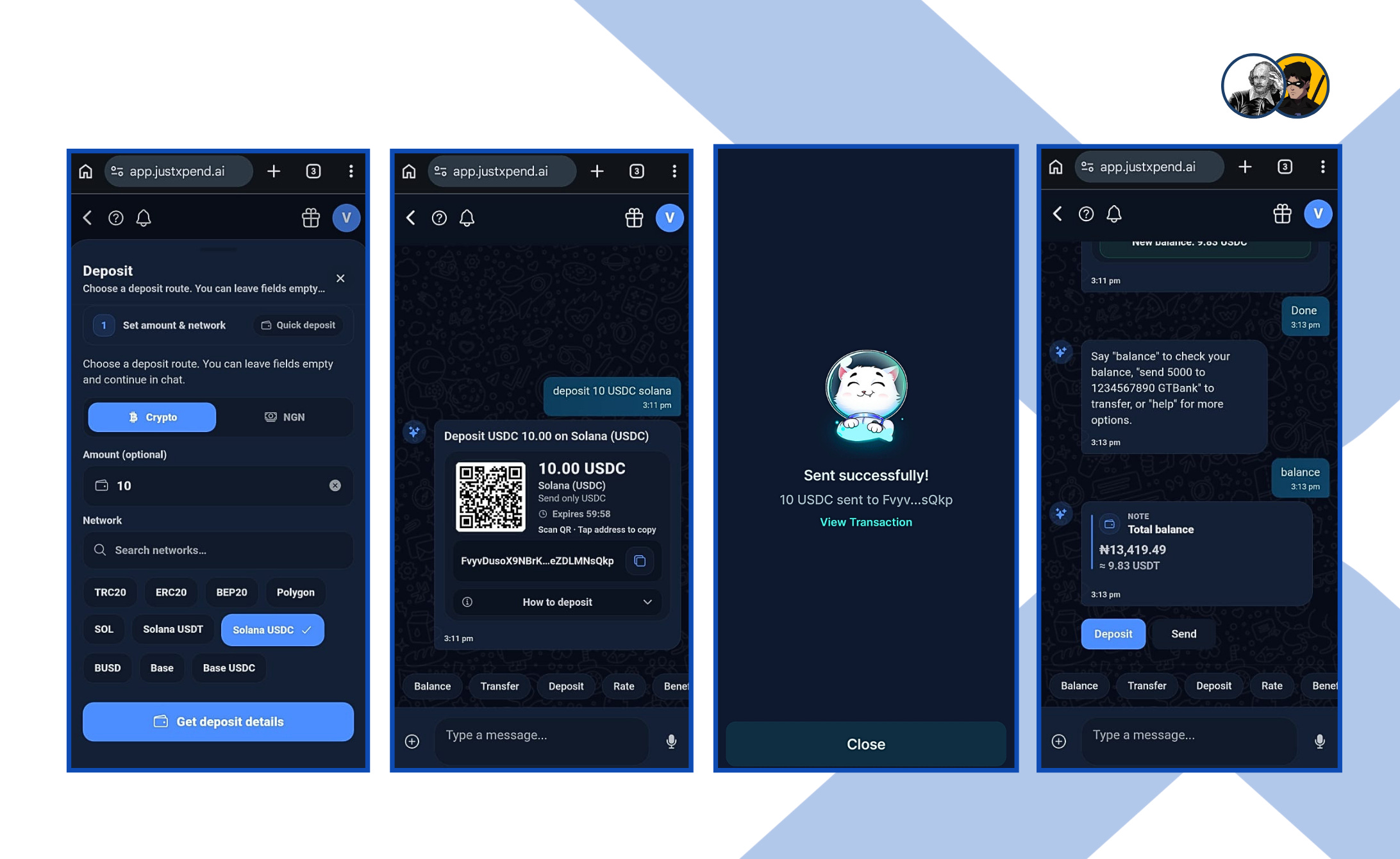
After you make the transfer, Xpend will ask you to check your balance right there in the chat. It then responds with your updated totals in both Naira and USDC, which is useful because it lets you see your value in the currency you understand locally while still keeping track of the stablecoin side. At that point, the account is fully funded and ready for transfers or payments.
Test 1: Buying Airtime
To test how Xpend handles daily transactions, airtime purchases serve as a practical and straightforward use case. The process starts directly in chat. After tapping "Airtime" at the bottom of the chat, you are prompted to select your provider (MTN, Airtel, Glo, or 9mobile). Simply choose your network and continue to complete the transaction.
Once the provider is selected, Xpend asks for the amount you want to recharge. In this case, ₦200 was entered. Immediately after that, it requests the phone number the airtime should be sent to. After entering the phone number, Xpend generates a summary of the transaction, showing the provider, the amount, and the recipient’s number. Once confirmed, you tap Pay and move to the authorization stage.
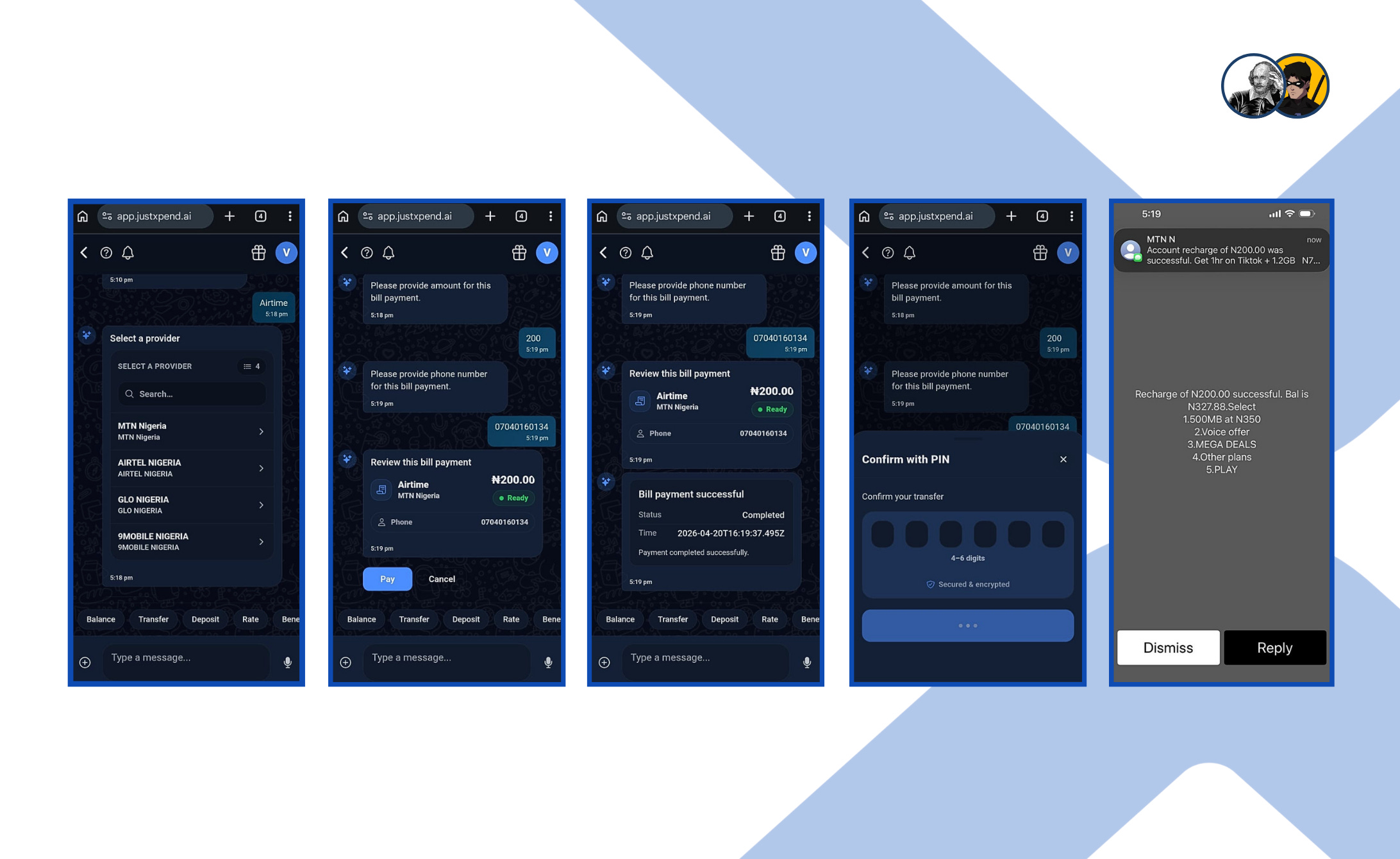
At this point, you are asked to enter your PIN to complete the transaction. Once the PIN is entered, the transaction is processed instantly. Xpend confirms that the bill payment was successful within the chat, and concurrently, a recharge confirmation message is received from the network provider itself.
The entire workflow stays within the conversation, allowing you to go from provider selection to topped-up airtime using USDC in just a few steps.
Test 2: Sending Money Using Xpend’s OCR (Optical Character Recognition)
I wanted to test a scenario very familiar to anyone who shops in Nigeria: sending money to a bank account using details written on a scrap of paper. This is how many transactions still begin; rather than repeating their account numbers all day, vendors often write them down and hang them in a visible spot for customers to see.
So I wrote down a Kuda Microfinance Bank account number on paper, took a photo of it, and uploaded it to Xpend. Xpend immediately parsed the image, extracted the account number, and prompted me to confirm the recipient. It then asked how much I wanted to send. The beneficiary’s name was automatically resolved from the account number, which is a critical step as you can see exactly who the money is going to before proceeding.
After entering the amount, Xpend moved me to a review screen. I could clearly see the transfer details: the amount (₦5,000), the beneficiary’s full name, the bank (Kuda), and the masked account number. There was also an option to save the recipient as a beneficiary for future transfers, which makes repeat payments easier.
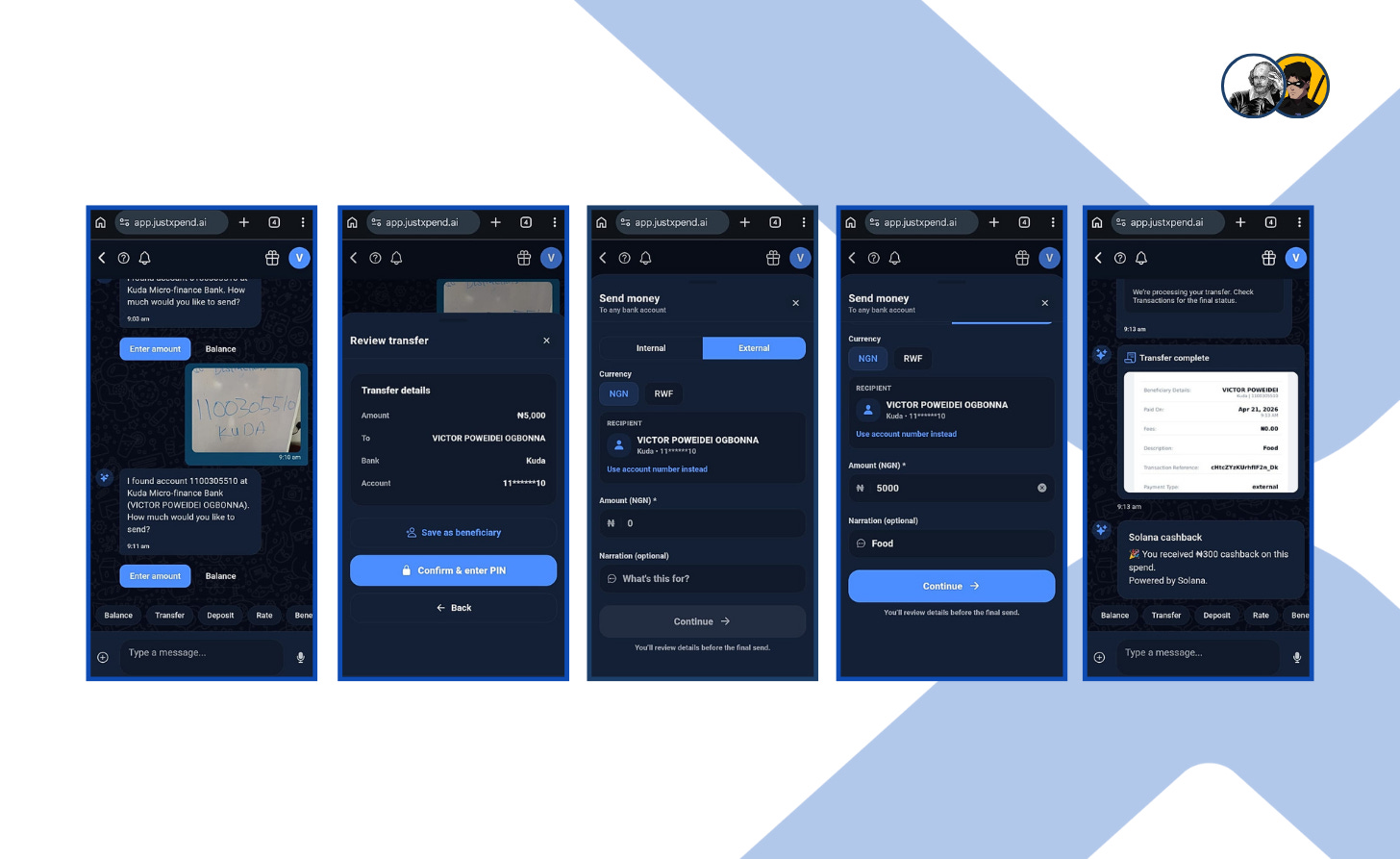
The interface distinguishes between internal and external transfers. Since this was going to a regular bank account, I selected External. I also noticed the currency options (NGN and RWF), showing that the system isn’t limited to just naira payouts. For this test, I stayed with NGN. I entered ₦5,000 and added a narration — “Food.” Once I tapped continue and entered my PIN, the transfer began processing.
The final screen confirmed that the transfer was complete. It displayed a clean, receipt-style summary with the beneficiary details, amount sent, transaction reference, and payment type. Then came an additional message: ₦300 cashback on the spend, powered by Solana. It was proof that the cashback promise is real. Xpend rewards users who deposit via USDT or USDC on the Solana network. The same deposit that funds your transfer also earns you money back.
Test 3: Testing Internal Transfers
I decided to try out Xpend’s internal transfer feature to see how it handled money sent from one Xpend user to another.
From the home page, I clicked “Send” and selected the Internal transfer option. From there, I entered the recipient’s Xpend username, @outstandingvick, and set the amount to ₦989.60. I also added a short narration, and once everything was in place, I continued to the next step.
Xpend then moved me to the review screen, where the transfer details were laid out clearly before anything was finalized. I could verify the amount and confirm that the payment was going to the actual person associated with the account.
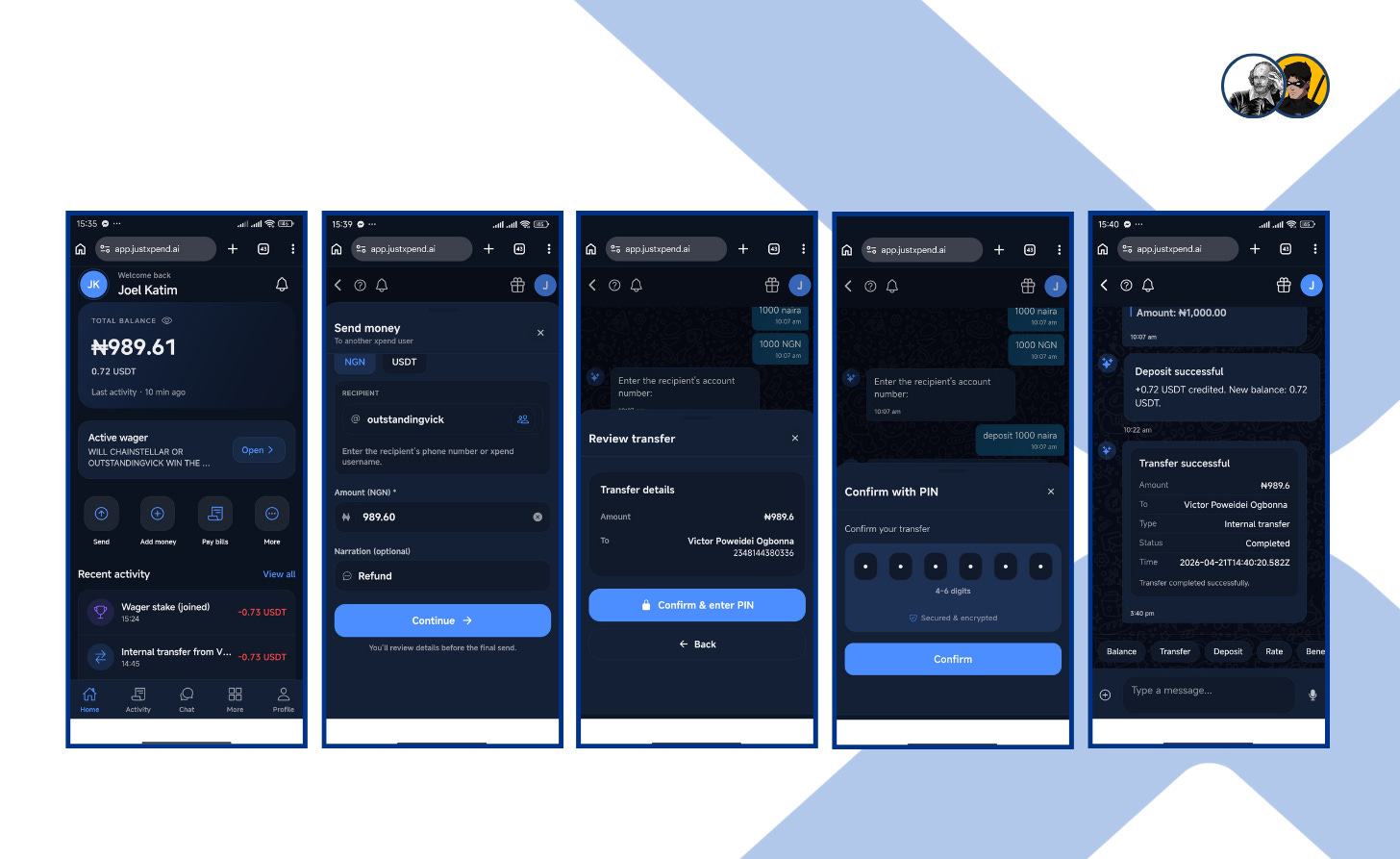
Next came the PIN confirmation screen. Once I confirmed the transaction by entering my passcode, the final screen showed that the transfer had gone through successfully. It displayed a clean transaction summary marked as an internal transfer, with the status set to completed. At the same time, the app also showed a “deposit successful” message, confirming that 0.72 USDT had been credited and the new balance had been updated.
Test 4: Paying a Utility Bill (Electricity)
Next, I moved into the Bills section and selected Utility Bills so I could see if Xpend can be a reliable gateway when NEPA calls for their money. From there, the app presented the available electricity providers, and I chose Port Harcourt Disco Electricity Bills.
Once inside the provider page, Xpend asked me to enter the amount, which I did by specifying ₦1,000.
After that, I input the meter number and proceeded to select the bill type, with the platform clearly separating the available options so there was no confusion about whether I was paying a prepaid or postpaid bill.
Then the “Pay” button was highlighted, showing the selected bill type (prepaid top-up) along with my meter number.
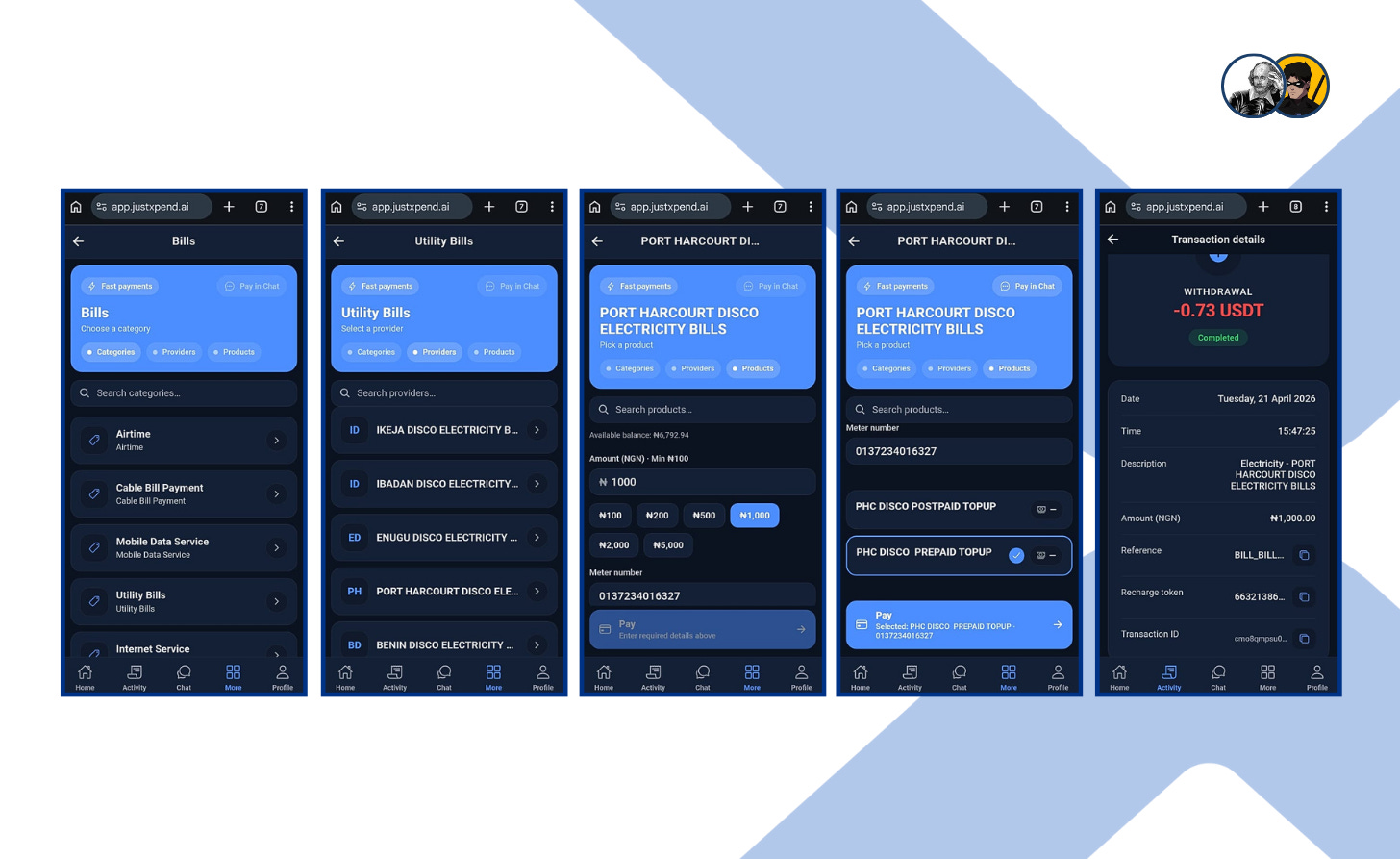
Once I confirmed the transaction, Xpend completed it successfully and displayed the final receipt. The details page showed the payment as completed, along with the date, time, amount, reference, recharge token, and transaction ID.
Test 5: Creating and Sending an Invoice
To test the invoicing feature, I decided to use a voice note to tell Xpend that I needed to create an invoice. Xpend picked it up and responded with a prompt guiding me to tap below and open the invoices screen. It’s a standout feature because it proves you don't always have to type—you can just talk to it, and it understands exactly what you need. From there, the platform opens a simple form where you enter the amount, choose the currency, and set how long the invoice should stay active. In this test, the invoice was set at 1000, with a 7-day duration selected.
After that, Xpend asks for the invoice details. You can add a description of the work or payment request, and the interface also gives you the option to include line items if needed. In this case, the description was for creation and hosting of a website for an online pharmaceutical shop.
Once the invoice is created, Xpend generates a shareable payment card with a QR code, the amount due, and the payment details. It also includes a field where you can enter the recipient’s phone number to send the invoice directly, making it quicker to share without breaking the flow.
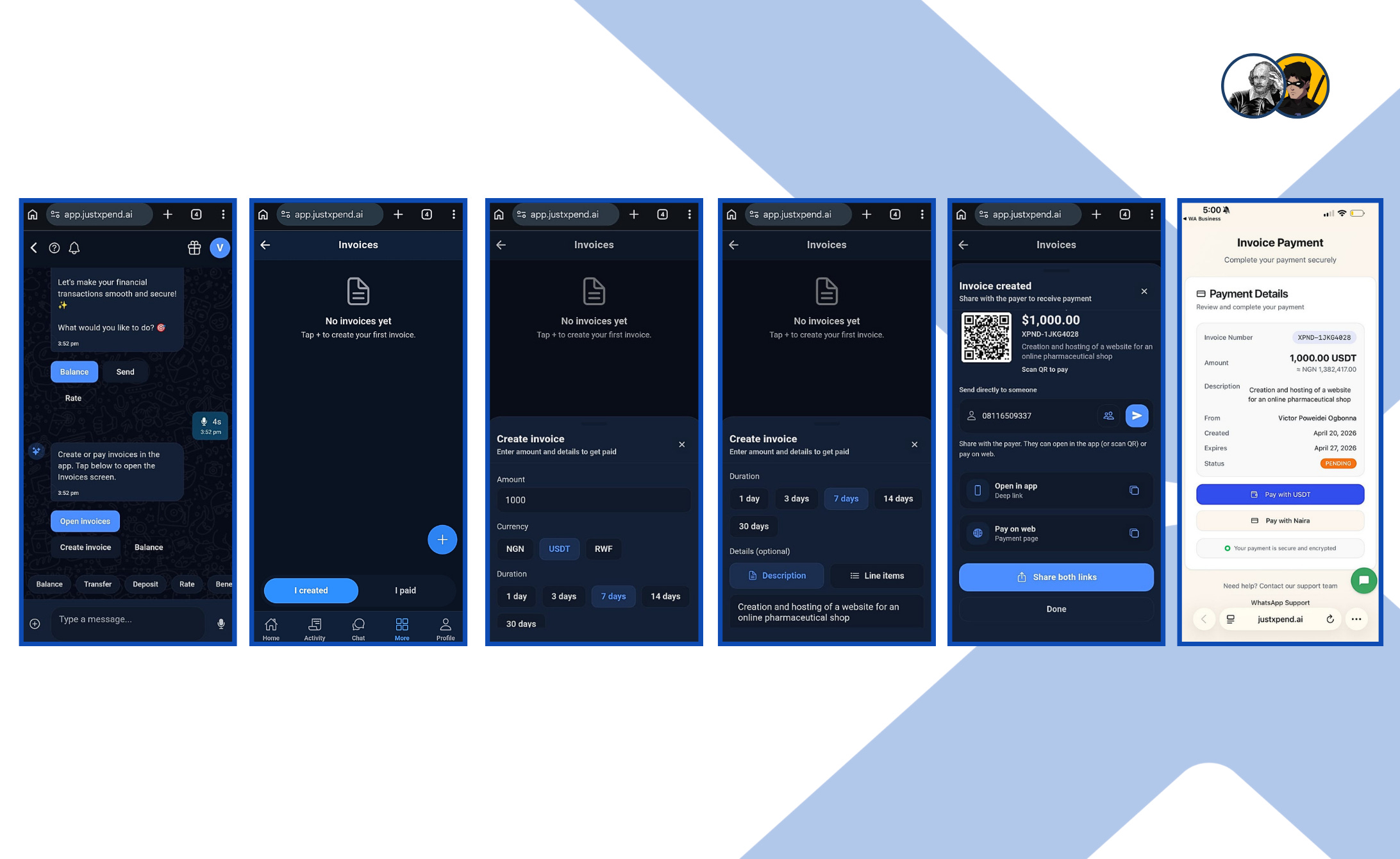
On the receiving side, the invoice opens as a proper payment page with the invoice number, amount, description, sender details, date, expiry, and status. The recipient can then choose how to pay, including payment with USDT or naira.
What stands out here is that Xpend is not just helping you request money. It turns a simple payment request into a documented, traceable flow that feels professional.
Test 6: Sending Gifts with XPackets
To test Xpend’s gifting feature, I opened the Gifts (Xpackets) section by tapping “Send gift” option at the bottom of the chat, which starts with a blank screen and a single + button to create a new gift. From there, the process is simple: you set the amount, choose the currency, and decide the gift type. In this test, the gift was set at ₦1,000, and I chose a single gift format, which means the full amount goes to one recipient.
Next, Xpend asks how long the gift should remain active. You can set an expiry window such as 24 hours, 48 hours, 72 hours, or 7 days, and you can also add a short message. In this case, I included a simple “Birthday” message. Once the gift is created, Xpend generates a gift card with all the key details: amount, currency, recipient count, creation date, expiry date, and status. You also get a share button, which allows you to send the gift link directly to your recipient.
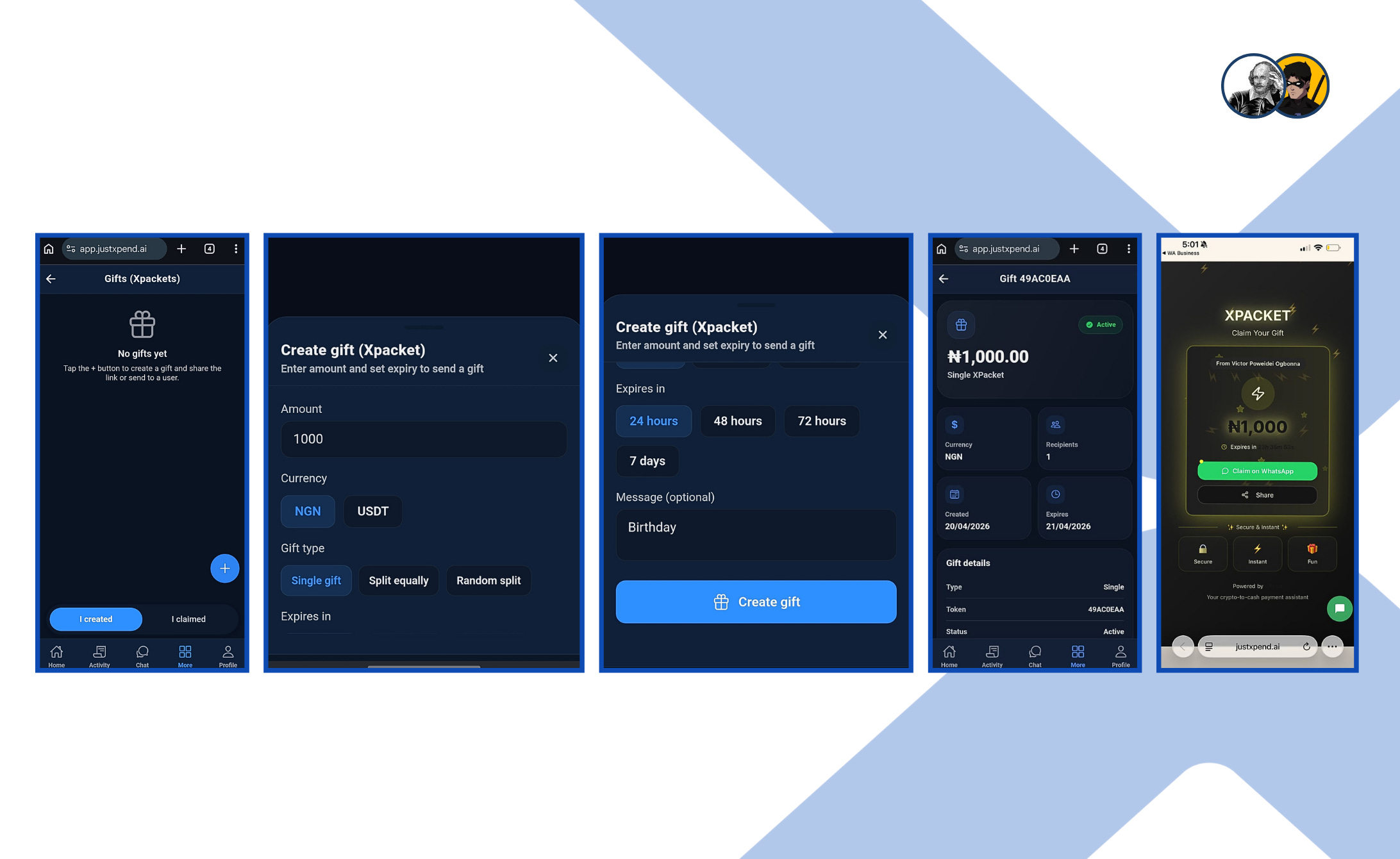
On the receiving side, the gift appears as a clean claim page branded as XPacket, with the amount displayed prominently and a clear Claim on WhatsApp button. The recipient simply claims it, and the value becomes available to use. This feature is interesting because it turns money into something that feels more like a gesture.
It is still a transfer, but the presentation changes the tone completely. Instead of sending cash in a plain transactional way, Xpend lets you send it as a shareable gift that can be claimed inside WhatsApp or the Xpend web app.
5.0 FEEDBACK & INSIGHTS FROM FIRST-HAND USER EXPERIENCE
My initial experience with the Xpend web app was marked by several critical bugs. Fortunately, with the help of the founder, Ugwuagba Benard, most of the critical issues were fixed before this article went live, as they would have affected its completion.
However, a few remaining problems are being documented here for the first time. Let’s start with the issues that have already been fixed.
i. Resolved Issues
The swift response from the founder helped stabilize the following core features:
Xpackets (Gifting): Initially, sending a gift via the Xpend share link caused a bizarre redirection. Instead of the Xpend interface, recipients were pushed to their own WhatsApp “share to contacts” screen. This has been fixed, and gift links now function as intended.
Utility Bills (Electricity): This feature was initially broken in two places. First, after selecting an electricity provider, you could enter the payment amount and meter number but couldn’t proceed any further. The next step, choosing the bill type, whether prepaid or postpaid, was missing entirely. That said, the issues didn’t end there. After successfully paying for a prepaid top-up, no recharge token was provided. This has now been fixed following my feedback and both issues are now fully resolved.
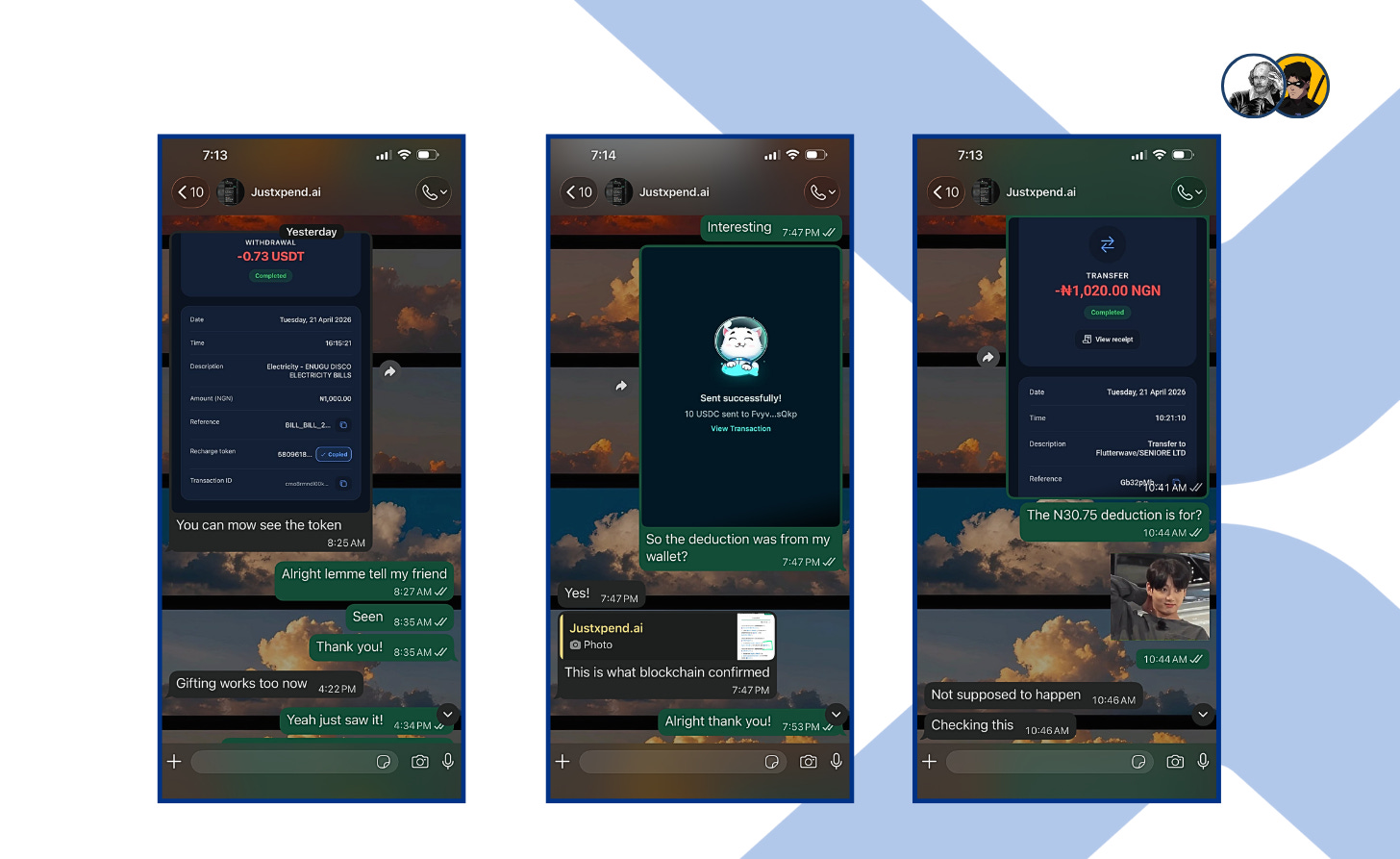
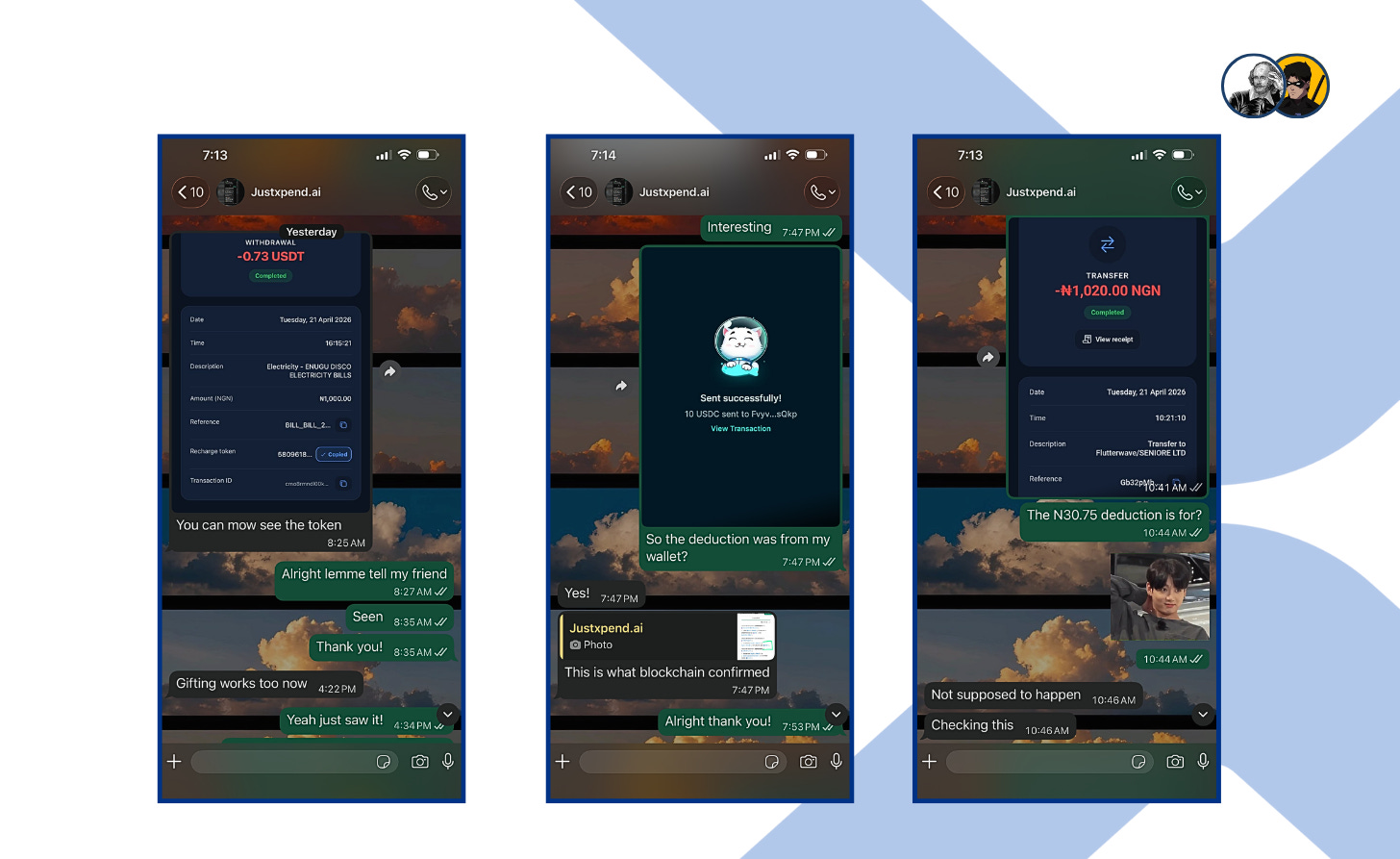
Figure 19: Conversation with the founder confirming and resolving key issues, including missing recharge tokens, incorrect deductions, and the broken gifting flow. Discrepancies in Balances: I noticed inconsistencies in transaction totals. A 10 USDC deposit was updated as 9.83 USDT; the founder attributed this to external wallet fees. Later, a transfer of ₦1,020 to another user resulted in only ₦989.25 arriving. The founder has committed to investigating these fee structures further.
ii. Now To The Issues Being Reported Here For The First Time.
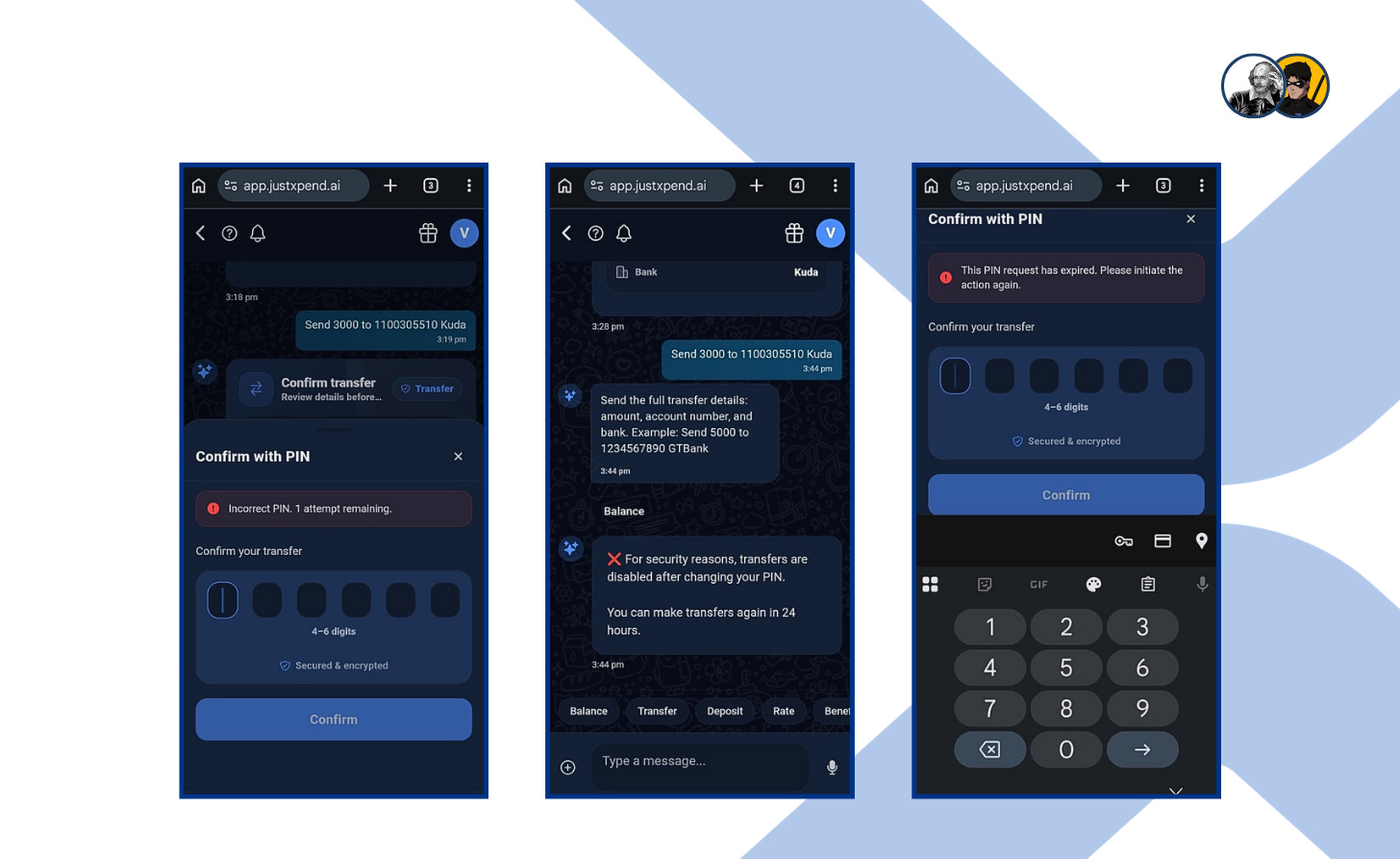
When I attempted to approve my first transaction, the app prompted me to enter a PIN but repeatedly returned an “Incorrect PIN” error, even though I was using the PIN I created during signup. I later realized the issue. I had never actually set up an authorization PIN. The app should have required this before allowing any transaction, but it didn’t. Instead, it displayed a misleading error message rather than indicating that no PIN had been set.
After setting up the authorization PIN, I still couldn’t proceed with the transfer. The app required a 24 hour wait period after “changing” the PIN, even though I had just created it for the first time. This feels unnecessarily restrictive. A more flexible alternative, such as biometric or live verification, would be far less disruptive, especially for urgent transactions.
On a related note, I encountered another error while trying to approve a transaction. The error message was— “The PIN request has expired. Please initiate the action again.”—The meaning of this message isn’t clear.
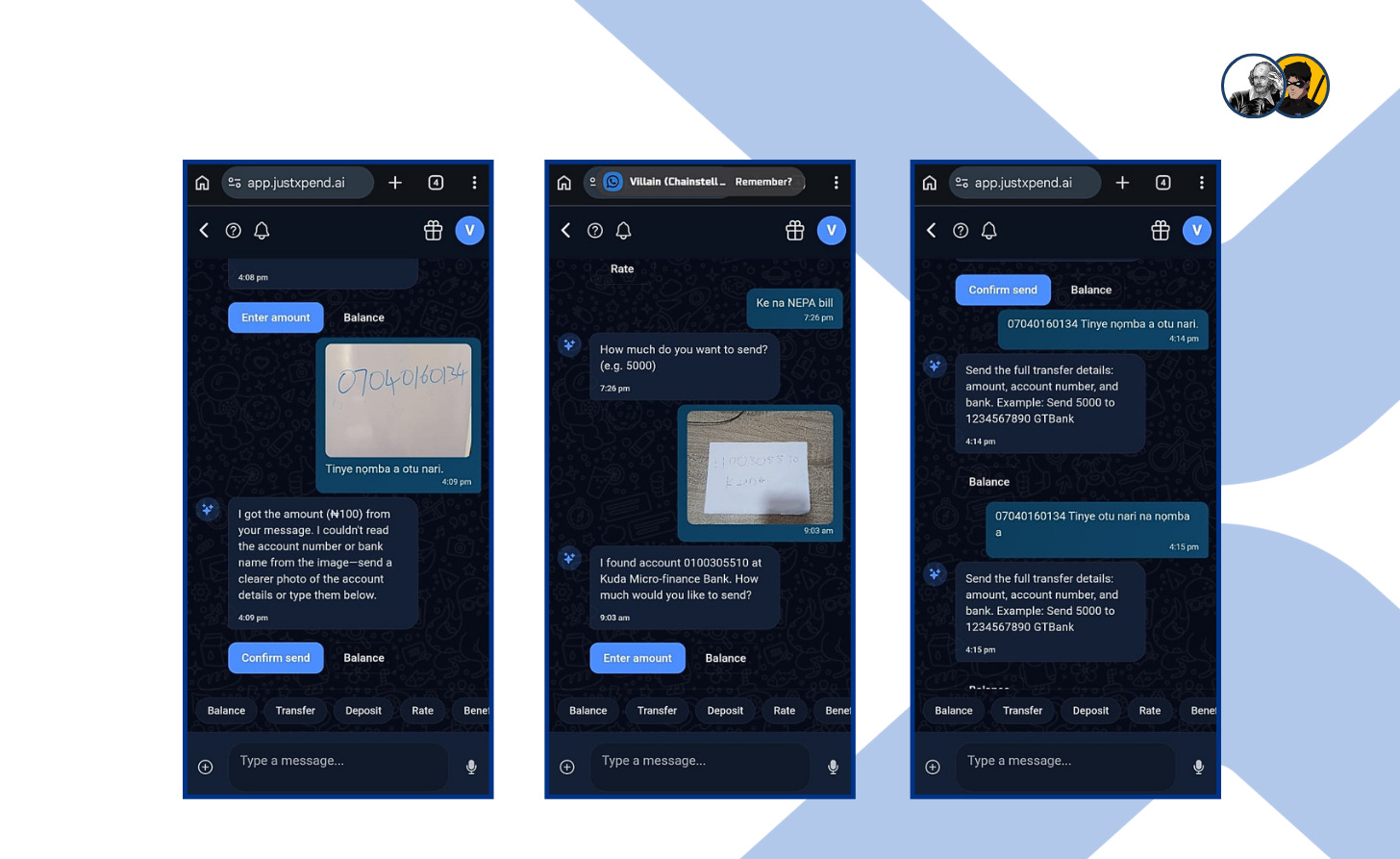
I also initially tested the airtime feature using an image based input. I wrote my phone number on a whiteboard, took a clear photo, and uploaded it to Xpend, instructing it in Igbo to recharge ₦100 to the number. While it correctly interpreted the language, it misread the phone number as a bank account number and responded that it couldn’t extract valid account details from the image. The image itself was clear, which points to limitations in Xpend’s OCR capabilities.
This wasn’t an isolated case. I encountered a similar issue when attempting a bank transfer using an image. The system misread the account number. The OCR functionality clearly needs improvement.
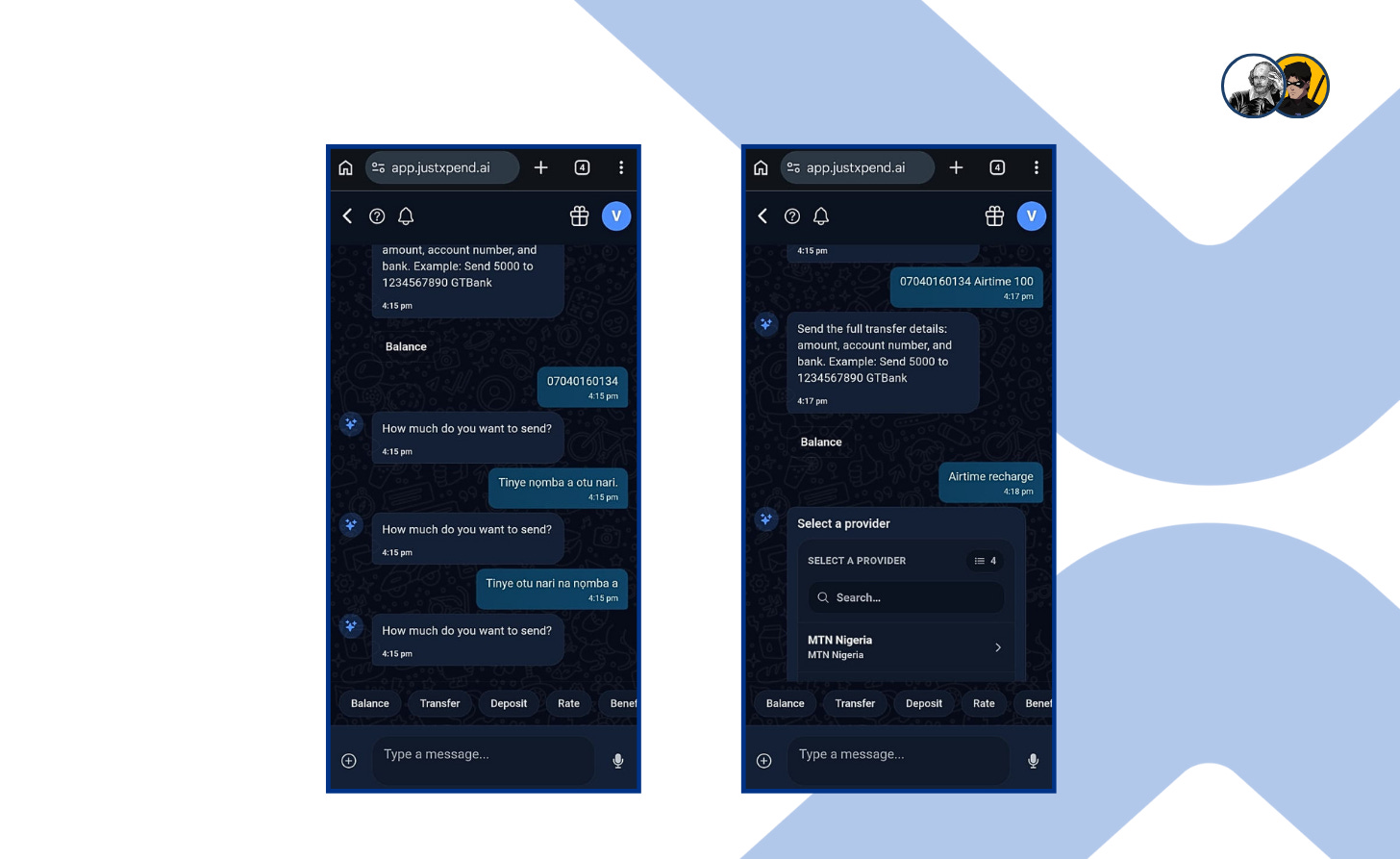
Returning to the airtime test, I decided to input the number manually and again issued the command in Igbo. “07040160134 Tinye nomba a otu nari.” The system responded with a generic prompt asking for full transfer details, amount, account number, and bank.
I rephrased the instruction. “07040160134 Tinye otu nari na nomba a.” It returned the same response. Even after simplifying the input to just the phone number, the system asked, “How much do you want to send?” When I answered in Igbo, twice, it failed to process the request and kept repeating the same question.
This suggests that the platform’s multilingual capabilities are overstated, and it struggles to distinguish between phone numbers and bank account numbers. Ultimately, the only way I was able to complete the airtime recharge was by using the “Airtime Recharge” option in the chat interface, which brought up a manual input form.
iii. My Outlook
These issues and bugs would have easily deterred a casual user. I only persevered because I was committed to stress-testing the platform.
While that effort proved rewarding, as many features are now working properly due to my feedback, it is risky to rely on users like me before basic functionality is properly tested and refined. This is especially concerning for features being marketed as key advantages, such as gifting and transfers.
My overall outlook for Xpend, however, remains positive. It addresses a real use case in Nigeria. The ability to manage a complete financial lifestyle—from utility bills and airtime to peer-to-peer gifting—all within a stablecoin ecosystem is a compelling value proposition. And it is preferable over other alternatives that require off-ramping first.
The problem Xpend solves is real and urgent. To truly succeed, however, the UI and UX must evolve from a promising prototype into a reliable, high-performance tool that users can trust with their daily finances without hesitation.
6.0 REMEMBER LAMJA?
Lamja did what many people do when something goes wrong and they can’t quite shake it off, especially those who transact in crypto often.
He tweeted about it.
He wrote about the P2P trade: how the vendor claimed they had “paid,” how he released his USDC, and how the money never arrived. It was a simple post, just him trying to get it off his chest. He didn’t think much would come of it, but people noticed.
Replies started rolling in. Even from many of his classmates, who were also active on X. Some people shared similar experiences, while others offered advice.
Somewhere in the middle of the noise, Xpend’s Twitter handle commented on the post, telling him to check them out “for next time.”
Skeptical at first, he visited the Xpend page and decided to give it a shot. He clicked the link in their bio, it took him to the official website and from there he opened the app’s WhatsApp interface.
He decided to test Xpend with a small transaction: loading a little USDC and sending the equivalent in naira to his bank account.
He typed out what he wanted to do, followed the prompts, and the transaction went through without any back-and-forth.
Xpend didn’t leave him on read.
And that was enough.
A few days later, the shift became visible. In school, conversations found him more easily. His post had gone viral, and people wanted to know if the issue was ever resolved. Someone asked how he was moving his crypto after the incident; another person wanted help understanding what crypto even was and how they could use it to pay for things. He told them all about the new platform he’d found: Xpend. He showed them how he was using it—step by step, chat by chat.
Word spread.
The same WhatsApp that used to feel one-sided began to feel different. His chats filled up with questions, small requests, and follow-ups. People reached out because he had something they needed, and they stayed because he was genuinely a cool dude.
Even his crush reached out.
Her elder brother was still having issues moving crypto and was also falling victim to P2P scams. Lamja introduced her to a better way to handle it. They spoke for a while after that, the conversation stretching longer than he expected. At some point, he mentioned that two writers had picked up his story for a bounty.
She found it funny. “So, you’re a case study now?” she asked.
“Something like that…Emi Starboy nau” he said with a chuckle.
They kept talking, and the conversation drifted into a small bet about whether the writers would win.

And, they decided to lock it in right then and there using the Xpend Wager feature.
Test 7: Waging Made Simple with Xpend
Lamja started from the Xpend web app, from the home screen, he simply tapped “More” at the bottom of the page to access the full set of options. That is where he found “Wagers.”
Once he entered the Wagers section, he could see that no wagers had been created yet. The screen was clean and simple, showing him that he could either create a new wager or join one through a link.
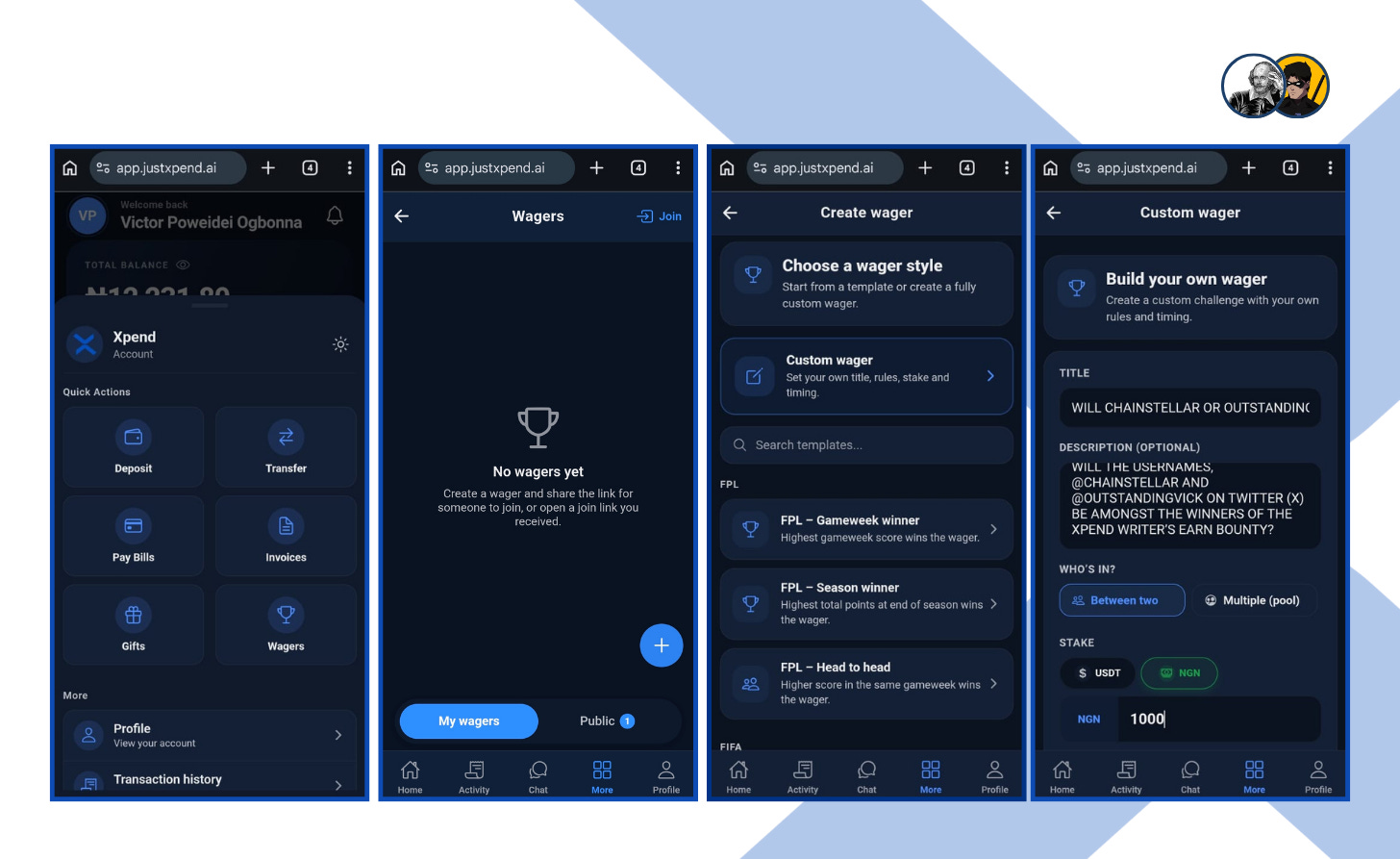
He then tapped into the plus sign that signifies creating a new wager, where Xpend presented him with two choices: he could either pick from a template or build something fully custom. Since this was not a generic bet, but one tied to his own story and his conversation with Katim, he chose the custom option.
That led him into the Custom wager screen, where he could define everything himself. He set the title, added the description, chose who the wager was between, and selected the stake. In this case, he entered the wager in NGN, since that was the value they were placing on the outcome.
After setting the wager details, Lamja moved to the final setup screen, where Xpend gave him one last chance to review everything before creating it. He could still see the wager type, the stake amount, the date and time fields, and the visibility setting. He kept it private, since this wager was only meant for him and Katim.
Once he tapped Create wager, Xpend brought up a confirmation prompt letting him know exactly what would happen next. The app told him that NGN 1000 would be debited to create the wager, and that the equivalent amount would be converted and deducted from each participant who joined.
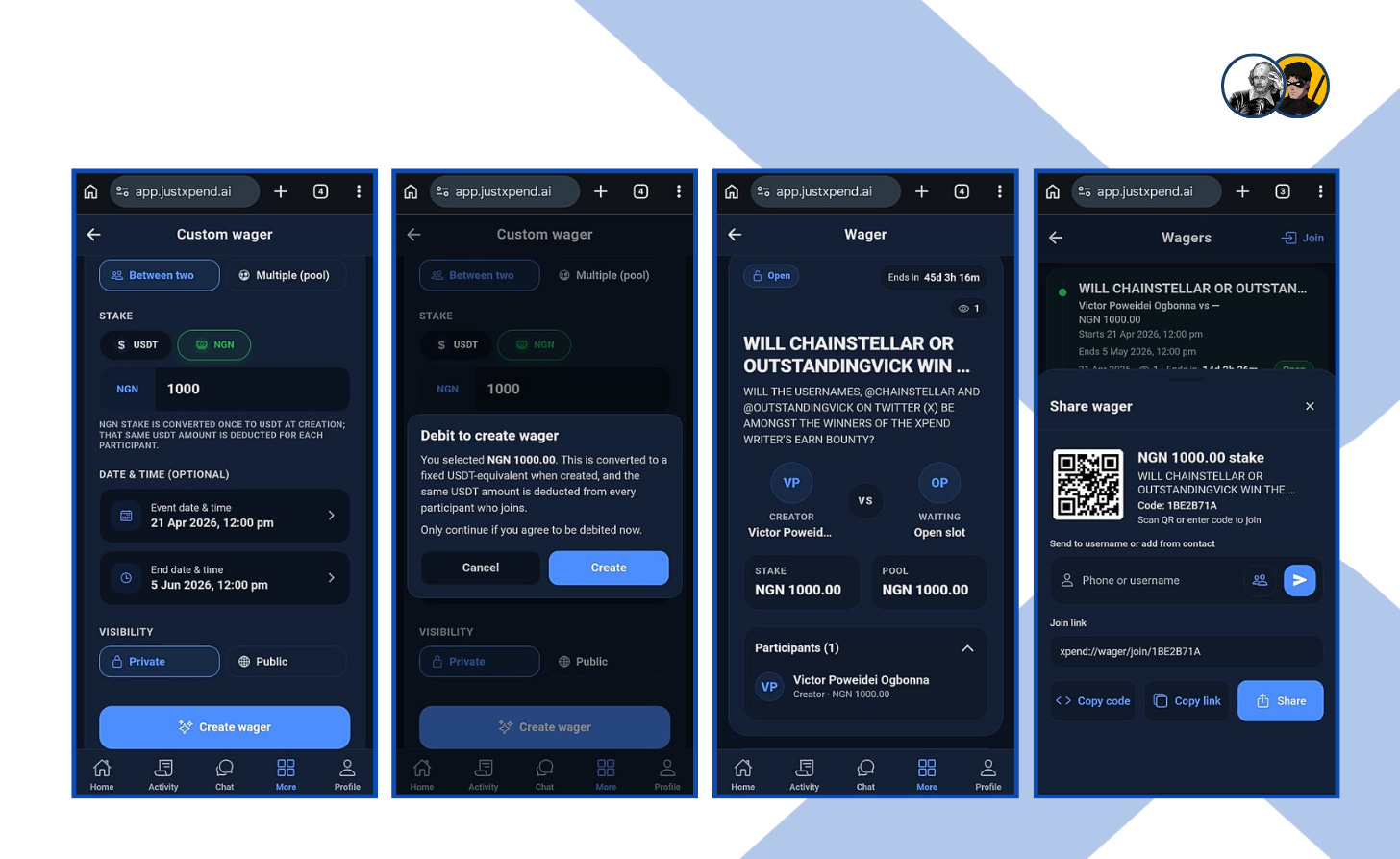
After confirming, the wager was created and moved into its live state. Lamja could now see the wager page with the title, the creator details, the stake, the pool value, and the participant section. At that point, the wager was no longer just an idea. It had become an active challenge, open and waiting for the second participant to accept.
The final screen showed him how easy it was to share the wager with Katim. Xpend generated a share panel with a QR code, a join code, and a direct link. He could send it by contact, copy the code, copy the link, or share it instantly.
On Katim’s end, Xpend opened to her home dashboard, where she could immediately see her balance, recent activity, and the main actions available to her.
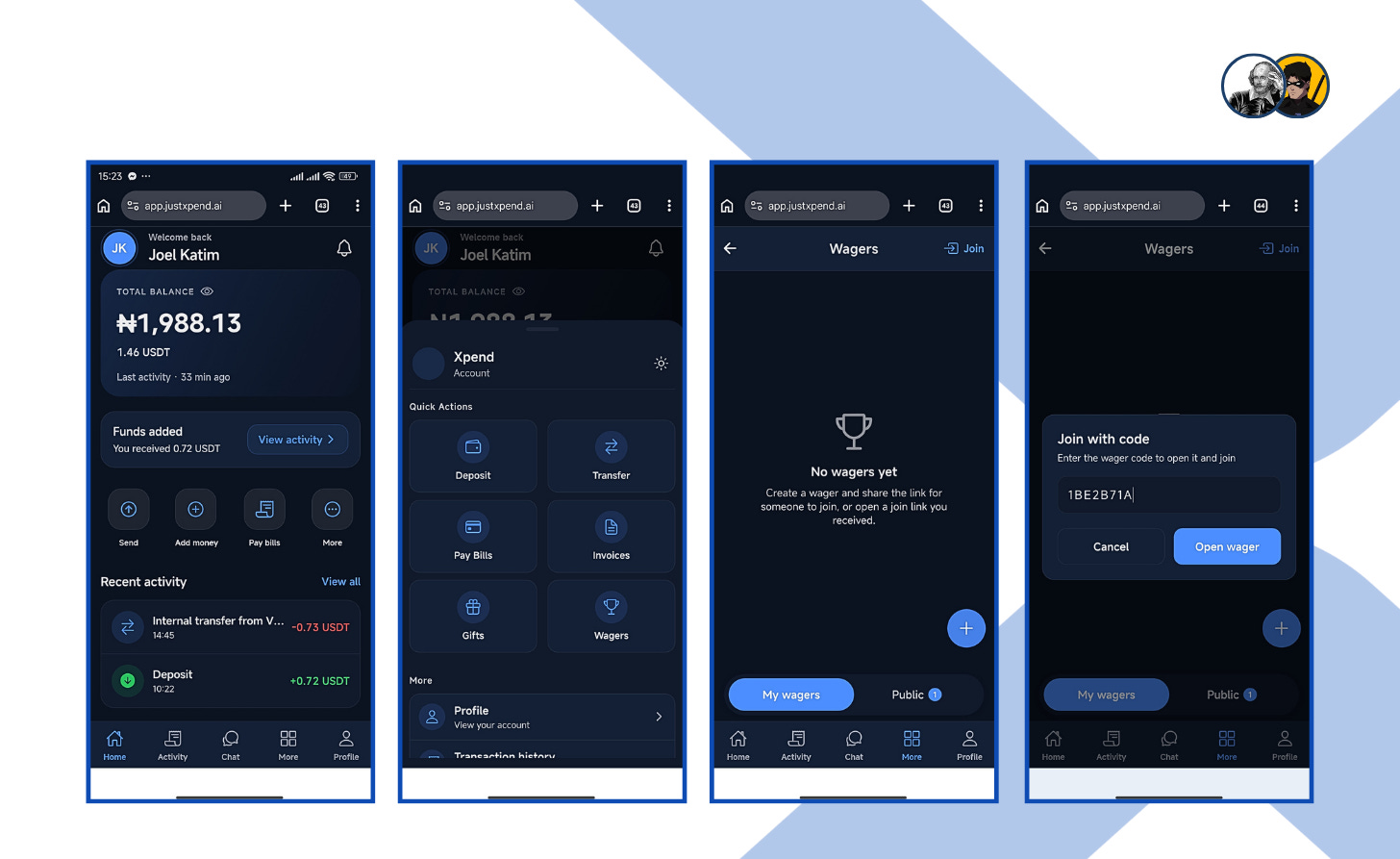
She tapped “More” from the bottom menu to access the full set of features, and from there she found “Wagers.” That brought her into the wagers section, where she could see that no wagers had been opened on her side yet.
Then she tapped Join, which brought up a code entry screen. Lamja had already shared the wager code, so all she had to do was enter it and proceed.
Once Katim entered the wager, the full challenge opened up clearly on her screen. She could see the title, the creator, the opponent, the stake, and the pool amount all in one place.
Before joining, Xpend showed her exactly what would happen next. It explained that NGN 1000 would be debited from her Xpend wallet immediately, and that the amount would stay in escrow until the wager ended.
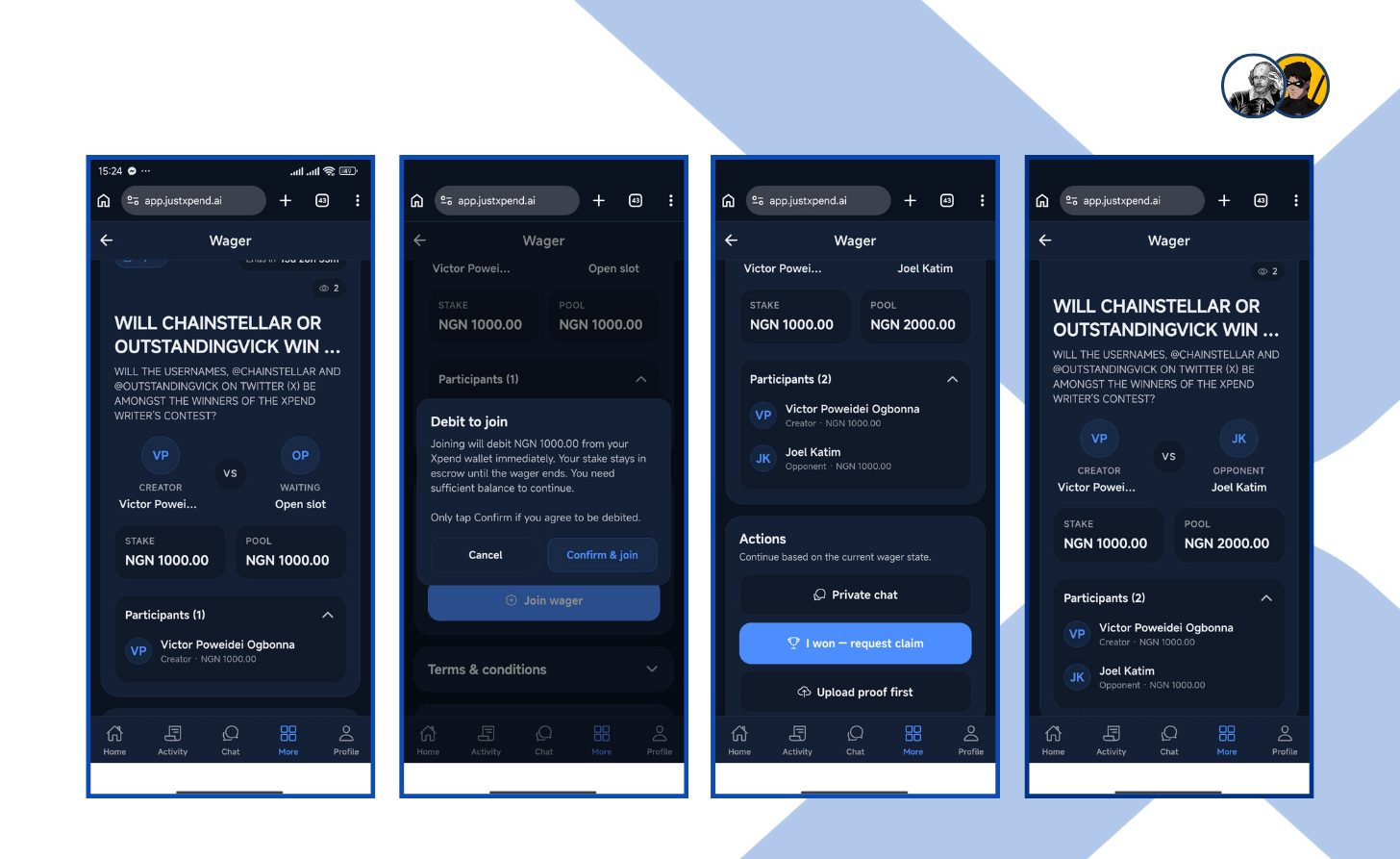
After she confirmed, the wager updated to include both participants. Now it was no longer just Lamja’s challenge. It was theirs. The stakes had been locked in, and both names were visible on the wager page.
7.0 CONCLUSION
For a moment, Lamja’s gaze lingered on the glass of his phone, tracing the reflection of a man transformed.
The screen, once a silent expanse of digital dust and unanswered echoes, had blossomed into a living pulse.
Where there was once only the hollow sting of a message left adrift, there was now the steady rhythm of voices that stayed, souls that responded, and the ease of digital exchange unfolding into the richness of community.

The tide had turned. No longer a ghost in his own inbox, he moved through the world seen and heard, and it all began with Xpend.